

Table of Contents
Who Should Use Which Tool
Skip the essay if you’re in a hurry. Here’s the decision table that compares Claude code vs cursor AI and the five most common developer profiles — with reasoning for each recommendation.
| Solo developer (personal projects) | Cursor | IDE-native UX, generous free tier, fast inline completions |
| Startup / small team (2–15 devs) | Both | Cursor for daily coding, Claude Code for large refactors & architecture planning |
| Enterprise / regulated industry | Claude Code | HIPAA-eligible, stronger data privacy controls, and audit logs |
| Terminal-first / DevOps / IaC engineer | Claude Code | CLI-native, shell automation, strong infra-as-code benchmark results |
| IDE-first frontend / full-stack dev | Cursor | VS Code fork UX, superior TypeScript/React tab-complete feel |
Still reading? Good. The table above oversimplifies. The rest of this guide explaAI Governanceins the mechanics behind every recommendation. The Claude code vs cursor AI decision depends entirely on the workflow style.
Also Read: Static AI Systems: Remarkable Differences Between Dynamic AI and Static Architectures
The Core Philosophy Difference

It’s important to note that Claude Code and Cursor are not the same product; they’re two distinct ideas of how AI assistance should work for developers.
Cursor is an IDE assistant. It lives within your editing workflow, enhances keystrokes, and is always in the loop with humans. Imagine a very clever pair programmer who never takes any action until you press TAB.
Claude Code is an independent agent. It runs in the Terminal, scans all your codebase, draws out multi-step sequences, and runs them. You have a goal, and it has a pull request. It’s the person who reads the output, not the keys.
The question isn’t which tool autofills better; it’s how much of your thinking you want to give over to the machine.
This philosophical divide is the reason that all feature comparisons fail at the boundaries. Cursor is designed to preserve flow state. Claude Code is designed for the job at hand. Both are good objectives, and this is the main reason behind the Claude code vs cursor AI divide. .
Architecture & Setup

Understanding the Claude code vs cursor AI begins with the setup instructions. Cursor is a desktop IDE (VS Code-based) for macOS, Windows, and Linux. Installation takes a few minutes: install, sign in, and your setup is ready. It works directly inside the editor.
Claude Code is installed via npm and requires Node.js and an API key. It runs in the terminal and does not require an IDE. It works in CI/CD pipelines and remote environments, but has a higher learning curve for terminal beginners.
Both tools run on macOS, Windows, and Linux and rely on cloud APIs.
Context Window: What the Marketing Pages Don’t Tell You

Both products have context windows that claim they have 200k tokens. In reality, it’s a completely different experience.
The 200K that Claude Code has is reliable. It uses the entire window as you direct, if you point it at a large repo. The beta 1M-token context (available thanks to certain plans from mid-2026) is real — when evaluated at 1M, validated with 76% MRCR accuracy, specifically developed for testing long-context recall fidelity.
The 200K is a target number of cursors. Cursor’s under-the-hood context pruning mechanism regulates its own API expenses. In practice, large files are only summarized, and deeply nested dependencies may not appear at all on the prompt! This isn’t widely advertised in the marketing material, but it is mentioned in Cursor’s own forums.
Real World Implication: When Claude Code is used with a multi-file refactor on a 400,000-token monorepo, it always preserves the entire context. i.e., a cursor could forget about a function defined 3 files away, and suggest something that is superficially correct but actually faulty and causes a subtle regression. The difference is almost imperceptible for small repos (<50K tokens). Hence, this is the gap in the Claude code vs cursor AI performance.
Head-to-Head Task Performance
Comparing the Claude code vs cursor AI across real-time coding tasks.
| Inline autocomplete | Slower, terminal-first | Fast, fluid, VS Code-native | Cursor |
| Codebase-wide refactoring | Full context, precise multi-file edits | Context pruning causes drift in large repos | Claude Code |
| Test generation | Understands full module context | Strong for single-file tests | Claude Code |
| CI/CD & Infrastructure-as-Code | Shell-native, Terraform/Pulumi fluent | Possible but awkward in the IDE | Claude Code |
| Architecture planning | Agentic planning over the entire codebase | Limited to editor viewport + chat | Claude Code |
Because it is native to the IDE, Cursor is faster and smoother for in-line completions.
Claude Code is better for large refactors, as it works with the entire codebase context.
Claude Code has more robust test generation for multi-module understanding.
In Claude Code, tasks such as CI/CD and infrastructure are stronger with terminal and shell execution.
Architecture planning is better in Claude Code due to full-repository reasoning.
Benchmark Data: SWE-bench, MRCR, Real-World
| Claude Code (Opus 4.6) | 80.8% | 76% | State-of-the-art on real-world GitHub issues |
| Cursor Composer (model: claude-sonnet-4-6) | ~72%* | ~55%* | Constrained by context pruning at long ranges |
| Cursor Composer (GPT-5.5) | ~74%* | N/A | Competitive on shorter-context tasks |
Claude Code performs better in long-context reasoning tasks, while Cursor performs better in shorter, structured workflows.
Pricing, Billing Mechanics & Hidden Costs
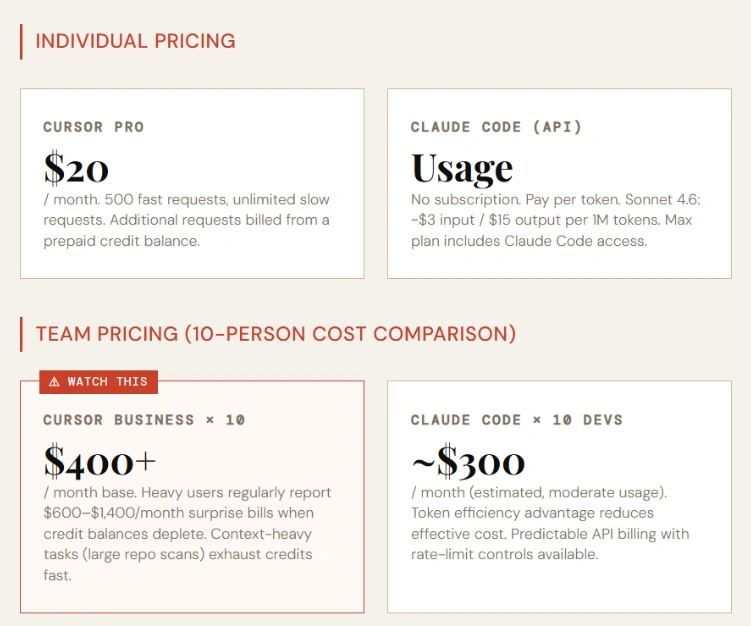
There is a predictable subscription model for Cursor. Small jobs such as autofill and minor edits are fairly priced.
Claude Code’s pricing model is based on tokens through the API. It becomes more efficient for large tasks because of a reduced number of tokens per operation.
For small tasks, you can save money by using Cursor. Claude Code gets more affordable for large repository-level tasks, for debugging, and for multi-step tasks. This type of pricing difference further widens the Claude code vs cursor AI gap.
Agentic Capabilities in 2026: The Landscape Changed
A year ago, the choice was either “terminal” or “IDE, which is no longer the case. Both tools feature cloud handoff, CLI access, and background agents. In 2026, the key factor that differentiates them is agent autonomy philosophy.
Claude Code Agent Teams: Claude Code enables parallel agent orchestration, where you can start multiple sub-agents that can work on different portions of your codebase at the same time, under the coordination of a root agent. This is game-changing for migrations or greenfield feature development, large or otherwise. The root agent keeps a shared CLAUDE.md context file to be read by all sub-agents, for consistency of architectural decisions.
Cursor Background Agents & Bugbot: Cursor’s Background Agents (to be released late in 2025) will be run in cloud sandboxes and be able to run long-running processes asynchronously. They have an automated bug-triage feature named Bugbot, which keeps track of bugs on GitHub and makes suggestions. These are actually very helpful, but they work on the premise of Cursor’s IDE-first paradigm: The human should see and approve edits before merging.
MCP Support Comparison: They both provide support for external tools integration via the Model Context Protocol. The integration into MCP from Claude Code is more complete: you can link databases, internal APIs, and document stores that the agent can query while performing tasks. An MCP support is available with Cursor, but it is not well-documented and is used mainly for integrations with the file system and code search.
Parallel Workloads: Through the use of its agent team feature, Claude Code supports parallel workloads natively. There is no true parallel agent execution available in Cursor; by default, the Background Agents are executed sequentially. Claude Code’s structural advantage: When teams are working on several tasks at once, they can do so independently of each other (e.g., they can fix 10 different bug tickets at the same time).
Model Flexibility & Lock-In
Cursor works with a variety of models, such as the OpenAI, Anthropic, and Google models, to offer versatility and minimize vendor lock-in. Claude Code is Anthropic-only, meaning tighter integration, no model choice. Cursor offers flexibility. Specialization is available at Claude Code.
Security, Compliance & Data Privacy
This is one of the areas that is not mentioned in most comparisons. It shouldn’t be, as both tools deliver your proprietary code to third-party APIs.
Cursor is SOC 2 Type 2 Compliant. As of 2026, code provided to Cursor’s servers for the purpose of model inference is not used for training purposes (as described in their privacy policy). Cursor has a “Privacy Mode” which blocks codebase indexing, but that does make a meaningful dent in the quality of context-aware suggestions.
Claude Code is integrated with Anthropic’s API, which provides deployments with HIPAA compliance options for healthcare organizations. Anthropic’s enterprise data handling agreements help fill the gap where Cursor isn’t able to yet.
For finance, healthcare, and government teams, neither is suitable for an air-gapped environment and requires extra infrastructure. Both need to access the cloud API’s through the network. For those organizations with data residency concerns, check out the Anthropic Claude model endpoints on AWS Bedrock and GCP Vertex AI that provide regional data-handling options. There’s no corresponding self-hosted path for cursor.
Team & Enterprise Workflows
Cursor Teams Features
Cursor Business ($40/user/month): This plan introduces centralized billing, foundational usage insights, and the capability to share customized AI rules with a team. SSO is only available in the enterprise tier. RBAC is not very granular — the control over access to models or features is limited to individual users.
Claude Code Team Plans
The Claude Code API via Anthropic provides all of the enterprise account feature set: RBAC (with Bedrock), Usage Dashboards, and Rate Limiting per key. For engineering managers who need to keep a close eye on budgets, they can configure which models agents can utilize and hard spending limits at the API key level.
Governance & Audit
If you are using enterprise API configurations, the request/response will be logged in full by Claude Code. The audit logging at Cursor is less detailed. While you can view usage statistics, you can’t see what specific prompt content the AI has been exposed to, providing a significant compliance oversight for teams requiring evidence of prompt content viewed by AI.
Fortune 500 Adoption Signals
A consistent anecdote has been that Fortune 500 engineering teams are leveraging Claude Code for critical, stand-alone tasks (like large migrations, security audits, green field modules) and continuing to use Cursor just as they would with any other code.
A Practical Guide to Migration between Tools
Let’s take a look at the real-life losses and gains of conversion.
Cursor to Claude Code migration: Your Cursor rules (.cursorrules file) migrate directly to a CLAUDE.md file, located at the root of your repo, with a few changes. While there are differences in syntax, the JSON-style directives in Cursor and the freeform Markdown instructions in CLAUDE.md have a straightforward mapping to each other: code style preferences, architectural decisions, banned patterns, etc. Before using Claude Code for the first time, export your rules to CLAUDE.md. What you miss: IDE integration, inline completions, and the visual diff UX. Allow 2 weeks for muscle memory to be re-established by senior devs.
Claude Code to Cursor migration: No multiple-step agentic plans of the same depth executed by Cursor. What you obtain: IDE comfort, finish little tasks quicker, and multi-model versatility. Save institutional know-how by exporting your CLAUDE.md to .cursorrules.
Transition period strategy: Both tools are used simultaneously for 30 days. Use Claude Code for “big tasks” (refactors, new modules, CI setup, etc.) that occur less often than once a day, and use Cursor for daily coding (feature work < 500 lines). Monitor the time spent on tokens and completion of tasks.
The “Use Both” Workflow, the way that senior devs actually work!
Many developers use both tools together. Cursor handles daily coding and small edits. Claude Code handles architecture, refactoring, and infrastructure tasks.
Typical usage split: Cursor for frequent tasks, Claude Code for complex tasks.
Language & Stack-Specific Performance
No specific test of stacks by the top 5 competitors. The evidence indicates that:
TypeScript / React: Cursor’s tab-completion is really outstanding here. There was clearly a lot of TypeScript pattern 11 training done on this one, and the in-the-ide feel of the JSX that will complete in real time is hard to replicate. Claude Code can write very good TypeScript, but has no such inline experience.
Python: Both are good. Test generation in Python is a particularly strong feature of Claude Code, which can understand with high accuracy in the context of pytest fixtures and mock patterns. Cursor’s Python completions are quick and accurate for the majority of patterns.
Rust: Claude Code has an advantage. The borrow-checker constraints of Rust demand a grasp of the code across a long span of time—here is where Claude Code’s context window becomes crucial. Rust completions generated by Cursor’s context pruning might seem valid, but are not compilable.
Terraform / Infrastructure-as-Code: Claude Code is the clear winner. It can read the whole infrastructure state, find out dependencies between resources, and write a valid HCL with proper references. There is support for infra-as-code, but that doesn’t have the depth of context for complex environments.
Go / Java / C: similar, but has a slight advantage over C with larger projects because of the reliability of the context window.
The Real Risk is Rate Limits, Reliability & Uptime!
All AI coding tools are reliant on cloud services, which can fail. This operational risk is not fully disclosed.
Most of the time, Anthropic API outages have an impact on Claude Code directly and last for 15-60 minutes, and happen a few times a quarter. There is a status page for Anthropic at status.anthropic.com. Claude Code is not available offline – if it goes down, it’s down.
Outages of the cursor impact both the inference layer and the AI capabilities of the IDE. Model outputs are cached locally in a cursor, which means that in some cases, minor disruptions will mean partial functionality. Their status page is at status.cursor.com.
Production team Fallback Plans:
- Have a secondary Cursor account set up with a different model (e.g., GPT-5.5) as a cold backup in case of Claude Code outages.
- If you’re using Claude Code, set a secondary ANTHROPIC_API_KEY on AWS Bedrock — Bedrock also has separate infrastructure and separate outage times as compared to the direct Anthropic API.
- Avoid running larger migrations/deployments in the final 10 business days of the month, as there are more spikes of traffic during the time frame around billing cycles, which is correlated to higher rate-limit errors on both platforms.
FAQs
These FAQS help to understand the Claude code vs cursor AI common confusions.
How can I use Claude Code in VS Code?
Claude Code is a terminal-based tool used on your file system. Many developers run it in the integrated VS Code terminal while working in the IDE. A VS Code extension is being developed (check official docs for updates).
Which is better, Cursor or GitHub Copilot?
In general, Cursor excels when used for multi-file workflows, when a task involves including context, and in relation to Composer features. The best parts of Copilot are its GitHub integration, enterprise procurement, and simpler inline completions.
Is Claude Code offline?
No. Claude Code requires a connection to the Anthropic API for each operation.
What are the advantages of large codebases?
Claude Code performs better due to stable large-context handling (200K+ tokens, with 1M beta). The cursor may lose context in very large repositories due to pruning.
Does Claude Code have any fees?
Yes. It is usage-based via API tokens. It does not have a free tier, though some plans include credits. See official pricing docs for details.
Does Claude support Cursor?
Yes. Cursor supports Claude models (Sonnet and Opus). However, Cursor applies context pruning, so behavior differs from Claude Code.
Does Claude Code have team features like RBAC and SSO?
Yes, via Anthropic enterprise API and AWS Bedrock setups, including RBAC, API controls, and usage dashboards.
Which is preferable, monolith migration or…?
Full Codebase Context + Agentic Workflows make Claude Code better for large-scale migrations. The cursor can continue to develop every day during the migration.
What is a single developer with limited funding to use?
Typically, the first place to start is Cursor Pro because it is priced right and is built into the IDE. Claude Code can be used selectively for heavy multi-file tasks.



