

Official HeyGen and Synthesia pages were reviewed for pricing, language support, security claims, SCORM support, and enterprise features when writing this article. AI video platforms are constantly evolving, so be sure to check the latest pricing and enterprise conditions with the vendor before buying.
Table of Contents
Which tool should you choose?
If you only read one section, read this one. Here’s the short answer to HeyGen vs Synthesia before you dig into the details below.
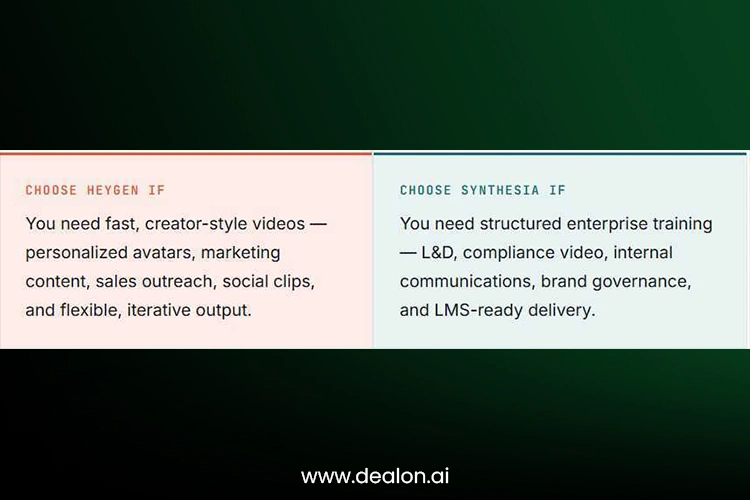
| User type | Better choice | Why |
| Solo creator | HeyGen | Faster creative workflow, avatars, social-friendly output |
| Marketing team | HeyGen | Good for campaigns, product demos, personalized video |
| L&D team | Synthesia | Stronger training, SCORM, governance, structured workflows |
| Enterprise team | Synthesia | Better compliance positioning, SSO, audit-friendly workflow |
| Localization-heavy team | Depends | HeyGen for broad language/dialect reach; Synthesia for controlled enterprise translation |
| Sales outreach | HeyGen | Personalized avatar/digital twin use cases |
| Compliance training | Synthesia | Better fit for standardized, reviewable training content |
| Agency | HeyGen | Flexible creative production and faster iteration |
| Regulated industry | Synthesia first, then evaluate HeyGen Enterprise | Stronger public trust/compliance messaging |
How we compared HeyGen and Synthesia
For this comparison, we evaluated both platforms based on the following criteria for buyers: ease of setup, avatar quality, workflow from script to video, localization, pricing model, team collaboration, enterprise controls, LMS integration, and production risk. We also reviewed public pricing pages, security documentation, and feature pages so we could differentiate between what we could find and subjectively verify user experience. This article is written from the point of view of the real experience of working with different teams to create, review, localize, and publish AI videos, and it’s not based just on the features.
Also Read: Top AI SEO Tools 2026: 10 Proven Tools For Better Rankings
The core difference — creative engine vs enterprise studio
Before comparing feature lists, it helps to understand the philosophy behind each product.
HeyGen feels like an AI video creation engine built for marketers, creators, agencies, and teams that need polished videos quickly. Synthesia feels like an enterprise video platform built around repeatable business communication — L&D, compliance, and controlled team production. Neither framing is a value judgment; they’re simply optimizing for different jobs.
In practice, that means HeyGen leans into speed, personalization, and avatar flexibility for marketing-style videos, while Synthesia leans into governance, learning workflows, and structured collaboration for enterprise control. The right choice in the HeyGen vs Synthesia debate depends less on raw “video quality” and more on how your team actually produces and approves video.
| Tool | Best for | Not best for |
| HeyGen | Marketing videos, personal sales videos, social clips, creator avatars, product demos, rapid localization | Strict L&D governance, heavy compliance workflows, and large formal training libraries |
| Synthesia | L&D, HR, compliance training, internal communications, SCORM/LMS workflows, enterprise review | Fast social-style videos, highly personalized sales outreach, casual creator content |
How HeyGen and Synthesia work
Both tools turn a script into a talking-head video, but the path from idea to export looks different.
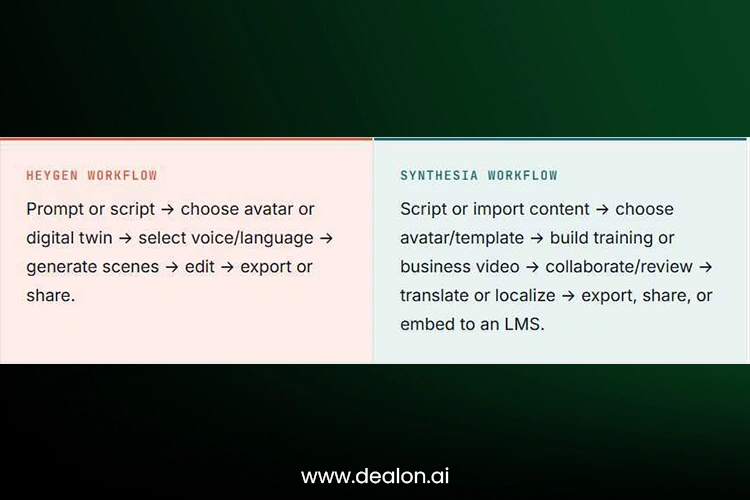
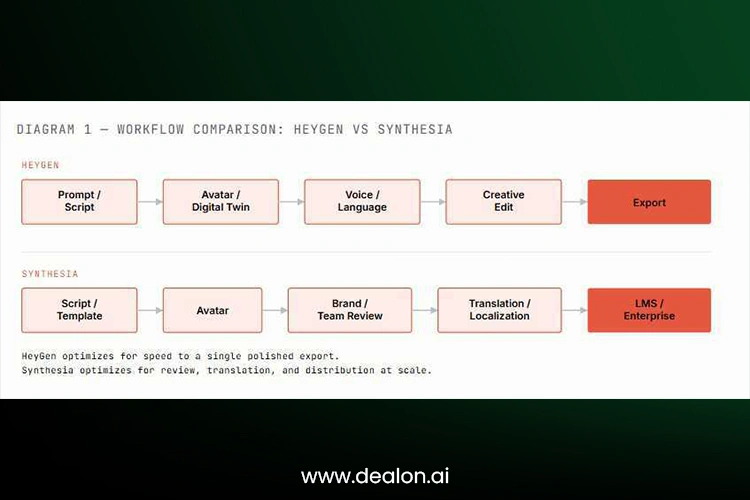
Typical AI Video Production Workflow
Before choosing between HeyGen and Synthesia, it helps to understand the basic AI video production workflow. Both platforms make video creation easier, but the final quality still depends on how well the content is prepared before generation.
This process starts with a script that is developed for a specific video purpose, audience, time, and style. A product demo can be more focused on the features, benefits, and call-to-action; a training video may need a slower, more step-by-step approach. The users will then choose the video format, from which they can choose various options such as aspect ratio, template, background, layout, and visual style. Here, the platforms start to vary in their characteristics: HeyGen is more flexible for creative and marketing videos, whereas Synthesia is more structured for formal business videos.
Then, you choose an avatar and voice. Depending on the purpose of the video, this may be a stock avatar, a custom avatar, or a personal digital twin. Next, the draft is reviewed for pronunciation, pacing, subtitles, brand consistency, and overall accuracy. Last but not least, the video is exported and shared through the right channel, such as social media, a website, email campaign, CRM, or LMS.
The best AI video tool is not necessarily the fastest one, as demonstrated in this workflow. A better option is the platform that covers the entire process from script preparation to review, approval, and distribution.
Setup, onboarding, and ease of use
How quickly can a new user, or a whole team, get to a usable first video?
Both platforms are browser-based, which keeps onboarding light — there’s no software to install, and most teams can generate a first draft video within their first session. The differences show up once you look past the first video and toward repeatable production.
- Template availability: both offer starting templates, but Synthesia’s templates lean toward business communication formats (training modules, announcements), while HeyGen’s lean toward short-form, social, and marketing formats.
- Script-to-video speed: HeyGen tends to feel faster for a single creator moving quickly from idea to draft.
- Team onboarding: Synthesia’s structure — templates, brand kits, review steps — tends to pay off once more than a couple of people are producing video together.
- Learning curve for non-designers: both are built for non-editors, so neither requires prior video production experience.
- Mobile access: Synthesia’s pricing page states the product is available on desktop, with mobile mainly supporting demo or free video access rather than full production — worth checking if your team expects to produce on the go.
In other words, HeyGen is more user-friendly for creators and marketers looking for fast results independently. Synthesia might seem more methodical for businesses that seek uniformity in templates, approvals, and format for every team member.
Onboarding Differences for Individuals vs Teams
The onboarding experience also changes depending on whether the platform is being used by one person or by a full team. A solo creator usually wants to move from idea to finished video as quickly as possible. This type of user may not need complicated approval steps, shared workspaces, or strict brand controls. For this reason, HeyGen can feel very attractive to individual creators, freelancers, founders, and marketers who want quick results.
When it comes to how fast, easy, and creative the onboarding is for one user, this is always a crucial factor. The user is looking for a fast interface understanding, testing avatars, pasting a script, and exporting a video without lengthy training. This is often the case in HeyGen’s workflows. It enables users to produce videos that are appropriate for social media, sales outreach, product updates, and short-form marketing materials.
Team onboarding is different. When multiple people are producing videos, consistency, permissions, templates, and approval workflows become more important. A business can have a number of users following the same brand guidelines, approved templates, and the same logo/colors, and videos need to be sent for review before publication. In this case, Synthesia’s more streamlined workflow comes in handy.
For instance, an L&D team can have to develop dozens of employee training videos across a variety of departments. Using different layouts, tones, avatars, and/or visual formats can make the video library inconsistent. The problem can be mitigated with the use of Synthesia’s structured templates and brand features, which can help to standardize the production process.
Summary of the difference: For one user, HeyGen might be easier to use, but for multiple users in a video production team, Synthesia can be more beneficial. That doesn’t imply that HeyGen is unavailable to teams, or that individuals can’t use Synthesia. It means that each platform is built around its own core strength. HeyGen is best suited for situations where speed and flexibility are the most important factors. In contrast, Synthesia is best suited for situations where repeatability and control are the most critical factors.
Avatar realism and presentation quality
This is one of the most-searched parts of the HeyGen vs Synthesia comparison, so it’s worth going deep.
Both platforms offer large libraries of stock avatars alongside custom or “personal” avatar options built from a short recording. The meaningful differences show up in tone rather than raw technical quality: HeyGen’s avatars tend to read as more natural in casual, creator-style delivery, while Synthesia’s avatars tend to read as more polished in formal, corporate-presenter delivery.
- Lip sync: both platforms invest heavily here, and both hold up well across most spoken languages.
- Gesture and body movement: HeyGen’s digital twins often show more natural, camera-style movement suited to marketing and outreach clips.
- Voice quality: both support a wide range of synthetic voices and voice cloning options on qualifying plans.
- Uncanny valley risk: this varies by avatar and script pacing more than by platform — shorter sentences and natural pauses reduce the risk on either tool.
| Quality factor | HeyGen | Synthesia | Winner |
| Stock avatar variety | Strong | Strong | Tie |
| Digital twin / personal avatar flexibility | Very strong | Strong | HeyGen |
| Corporate presenter style | Strong | Very strong | Synthesia |
| Social / marketing style | Very strong | Good | HeyGen |
| Training video consistency | Good | Very strong | Synthesia |
| Lip-sync localization | Strong | Strong | Tie |
| Natural creator-style delivery | Strong | Good | HeyGen |
| Formal business delivery | Good | Strong | Synthesia |
Localization, translation, dubbing, and multilingual video
Both platforms compete hard here, and it’s frequently the deciding factor for global teams.
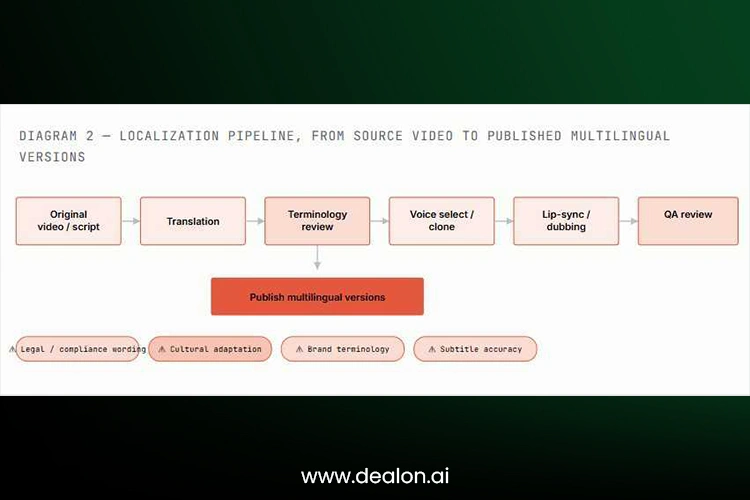
HeyGen’s official pricing page cites 175+ languages and dialects on paid plans. In contrast, Synthesia’s pricing page cites 160+ languages and voices along with AI dubbing and translation features, including enterprise-grade translation capabilities. Both support lip-sync translation and voice cloning on qualifying plans, so the raw language count is only part of the story.
What matters more for most teams is what happens after machine translation: script editing, brand glossary or terminology control, and human review of tone and accuracy. Neither platform’s automated dubbing should be treated as a final, unreviewed step for legal, medical, or safety-critical content — human QA is still recommended.
Head-to-head task performance
Feature lists only go so far. Here’s how the two tools tend to perform against five practical, real-world tasks.
| Task | What to test | HeyGen strength | Synthesia strength | Winner |
| Product demo | Speed, visuals, avatar delivery | Strong | Good | HeyGen |
| Training video | Template, structure, clarity | Good | Strong | Synthesia |
| Localization | Language reach, lip sync, review | Strong | Strong | Depends |
| Sales outreach | Personalization, avatar realism | Very strong | Good | HeyGen |
| Compliance module | Review, governance, LMS export | Good | Very strong | Synthesia |
Product demos
HeyGen tends to get a 60-second product demo from script to export faster, thanks to lighter-weight editing and quicker avatar generation — useful when a demo needs to ship the same day.
Training and onboarding videos
Synthesia’s structured templates and repeatable formatting make it easier to keep a library of training videos visually consistent over time, which matters once you have dozens of modules rather than one.
Sales outreach videos
HeyGen’s digital twin and personalization features are well-suited to one-to-one or one-to-many outreach clips where a rep wants to appear on camera without filming each version manually.
Localization at scale
Both tools can turn one English video into five language versions, but the cost and QA burden scale with the number of languages and the amount of human review each one needs — budget for review time, not just translation credits.
Compliance and L&D videos
Synthesia’s review flows, brand control, and SCORM export tend to matter more here than raw avatar realism, since compliance content is judged on accuracy and traceability as much as polish.
Pricing and hidden costs
AI video pricing rarely stops at the monthly plan fee. Look at minutes, credits, seats, and translation costs before comparing sticker prices.
HeyGen’s public pricing includes Free, Creator, Pro, Business, and Enterprise tiers, with Business listed at $149/month plus $20 per seat per month. Synthesia lists a Starter plan at $29/month and a Creator plan at $89/month, with Enterprise pricing available on request, and credits used across both video generation and other AI features.
Before committing, estimate your monthly production volume and check: minutes or credits included, export resolution limits, whether custom avatars are included or billed separately, translation and dubbing costs per minute, the price of adding review or proofreader seats, and what happens when you exceed your plan’s usage.
| Cost factor | HeyGen | Synthesia | What to check |
| Free plan | Yes | Yes | Watermark, duration, export limits |
| Entry paid plan | Creator-style plan | Starter-style plan | Monthly minutes/credits |
| Team plan | Business + extra seats | Creator/Enterprise path | Seat cost and collaboration |
| Enterprise | Custom | Custom | SSO, security, usage, support |
| Translation | Credit-based | Credit/minute-based | Dubbing vs. full video translation |
| Custom avatars | Included / limited / add-on by plan | Included / limited / add-on by plan | Processing time, consent, rights |
| LMS / SCORM | Business/Enterprise features | Enterprise-focused | Required for most L&D teams |
| Hidden cost | Credit burn, extra seats, review time | Credit burn, enterprise add-ons, review time | Model against real monthly volume |
Prices are subject to change, and these should be considered as snapshots and not as fixed prices. Both HeyGen and Synthesia use plan limits, credits, seats, minutes, translation usage, and enterprise add-ons, meaning the lowest advertised plan might not be the lowest cost plan for a real team. Calculate the cost of your actual monthly workflow before you make your choice; this includes the number of videos, average video length, languages, users, custom avatars, review seats, and integrations with your LMS and/or CRM.
How to Calculate the Real Monthly Cost
When comparing HeyGen and Synthesia, users should avoid looking only at the entry-level monthly price. The real cost of an AI video platform depends on how often the team creates videos, how long those videos are, how many users need access, and how many extra features are required.
The first factor is video volume. A user who creates one or two short videos per month will have very different needs from a company producing weekly training modules, product updates, or localized campaigns. Teams should estimate their monthly video output before choosing a plan. This includes the number of videos, average video length, and number of language versions.
Another factor to consider is the number of seats. Some teams require just one creator account, and there are those that require writers, reviewers, brand managers, and department leads to access the platform. Additional seats may add to the total price, particularly if you’re adding in features like collaboration and approval.
The third factor is the use of translation/dubbing. If you are creating a video in a single language, the cost of the video could be multiplied by five, ten, or even twenty if it has to be localized into those other languages. The cost of the platform should not be the only thing teams consider; they should also take into account the time that will be required for people to review translated scripts.
Custom avatars and voice cloning are the fourth factor. These can be powerful but can also prove to be expensive, may need a more advanced plan, might need more processing time, or firm consent. These costs should be verified before anything else when considering the implementation of executive avatars, sales rep avatars, or branded presenters.
The fifth factor is the reviewing time. This is an overlooked expense that many teams neglect. While AI can produce videos swiftly, certain aspects must be examined, such as the script, the visuals, the message, and the accuracy of the video. This review process can be as crucial as the tool for regulated industries.
The best way to compare costs is to develop a sample, monthly production schedule. For instance, 10 videos (2 minutes each) in three languages and produced by three members of a team. Then compare the pricing of that same workflow, within HeyGen and Synthesia. This approach provides a better overall view than just comparing the cheapest monthly plans.
Team collaboration and enterprise workflows
This is where the enterprise-versus-creative split becomes most visible — and it’s a gap many comparison posts skip.
HeyGen’s Business and Enterprise tiers list SAML/SSO, centralized billing, workspace collaboration, draft commenting and editing, team management, SCORM, LMS integrations, and SCIM provisioning at the Enterprise level. Synthesia’s Enterprise plan highlights SAML/SSO, live team collaboration, brand kits, SCORM export, onboarding support, implementation services, and a dedicated customer success contact.
The most critical team collaboration aspects are multi-seat access, management of the workspace, comments, and a structured review cycle. These capabilities enable several people to collaborate on videos in an organized manner. Consistency is achieved with shared brand assets, shared templates, and roles that help ensure consistency across departments, access control that makes it easy to manage permissions, and version history, which enables changes to be tracked. Centralized billing is also better when it comes to cost tracking by larger teams across users and departments.
Security, compliance, and data privacy
This is a genuine gap in most HeyGen vs Synthesia comparisons — worth reading closely if you work in a regulated industry.
Before adoption, finance, healthcare, education, and government teams should confirm whether videos are moderated, how avatars and voices are protected against unauthorized use, what happens to uploaded scripts and brand assets, and whether current, dated security reports are available on request.
HeyGen states its Enterprise plan includes SOC 2 Type II, GDPR, and CCPA compliance. Synthesia publicly lists SOC 2 Type II and GDPR compliance along with ISO 42001, and its responsible-AI documentation discusses ISO 42001, ISO 27001, and ISO 27701 as part of its AI risk, security, and privacy lifecycle. Treat both as a starting point for due diligence, not a substitute for it — request current certificates directly from the vendor before signing.
| Claim to verify | HeyGen | Synthesia |
| SOC 2 Type II | Yes, public security page says SOC 2 Type II | Yes, pricing/security pages mention SOC 2 Type II |
| GDPR | Yes | Yes |
| CCPA | Yes, public HeyGen security/pricing pages mention it | Not always emphasized in the same way |
| ISO 42001 | Not the main public claim | Stronger public positioning |
| SCIM | Enterprise | Enterprise/security workflow dependent |
| SSO/SAML | Business/Enterprise | Enterprise |
AI safety, avatar consent, and deepfake risk
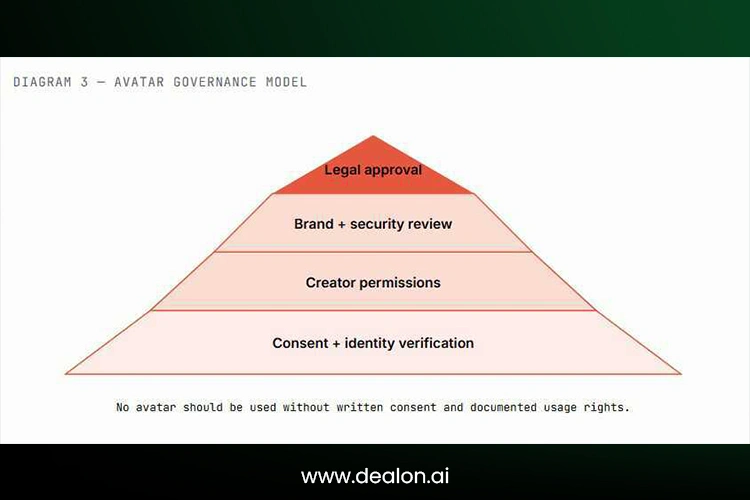
AI avatar tools raise ethical questions that don’t exist in traditional video production. Any team using either platform should have a written policy before creating an avatar of a real person.
Key questions to settle internally: Who will be able to sign up to provide an avatar or voice clone, what forms of documentation will be used to establish consent, who will be able to make videos with the executive’s face or voice, if an outward facing video will include any AI-generated disclosure, and what will be the escalation path if the avatar is used in a manner inconsistent with the authorized use. Whether shared on Facebook, X/Twitter, LinkedIn, or YouTube, a fake endorsement using someone’s likeness can create legal and reputational risk.
Integrations, publishing, and LMS support
A video is only useful once it reaches the audience it was made for — here’s how each tool gets it there.
HeyGen lists LMS integrations, SCORM export, and integrations with n8n, Make, HubSpot, and Zapier on its pricing page, which supports both marketing automation and internal training pipelines. Synthesia lists SCORM export alongside enterprise features such as brand kits, API access, SAML/SSO, and live collaboration — the emphasis leans toward enterprise learning and internal distribution rather than marketing automation.
If your workflow depends on pushing finished video into a CRM, marketing platform, or automation tool, verify the specific integration exists today rather than assuming from a feature list — automation ecosystems change often. If your workflow depends on an LMS, confirm SCORM version compatibility with your specific LMS provider before committing.
Best use cases by department
Different teams inside the same company often land on different answers to HeyGen vs Synthesia.
Marketing teams
HeyGen usually fits campaign videos, product demos, creator-style content, localized ads, and personalized landing-page videos where speed and iteration matter more than governance.
Sales teams
HeyGen is often the better fit for avatar-based prospecting and personalized sales explainers sent directly to individual leads or accounts.
HR and internal communications
Synthesia is often better for onboarding, policy explanations, internal announcements, and repeatable company-wide messaging that needs a consistent look over time.
L&D teams
Synthesia is usually stronger for structured training, SCORM export, compliance modules, quizzes, and enterprise learning workflows that need to plug into an LMS.
Customer success teams
Both can work here. HeyGen suits quick, personalized customer explainers; Synthesia suits a polished, structured help-center or training video library.
Video quality by format
Instead of rating video quality in general, it’s better to see the performance of each video tool on a particular type of video.
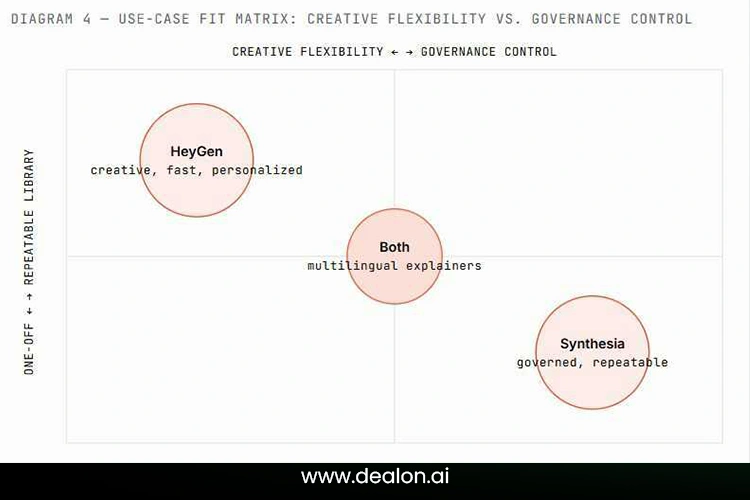
HeyGen’s speed and creative flexibility have made them the preferred choice for product demos, explainer videos, social shorts, and more. Internal announcements, compliance training, and course modules often prefer Synthesia’s structure and repeatability. Things that work well on either platform are sales outreach and avatar updates for executives. In contrast, multipurpose explainers and product education are more likely to be successful with HeyGen’s personalization features.
Reliability, rendering limits, and production risk
A gap section most comparisons skip — but production risk matters as soon as a real campaign deadline is on the line.
Consider rendering queue times during peak usage, per-video duration limits, how quickly credits get exhausted on a busy month, translation processing delays for larger batches, and how long custom avatar processing takes before it’s ready to use. Any of these can create deadline risk if a launch date depends entirely on the platform being available and fast on a specific day.
A practical tip: Ensure that your production workflow is not dependent on a single AI video service, but has contingency measures in place. This helps prevent a slow render, platform delay, or account issue from blocking a campaign launch.
Migration guide — switching between HeyGen and Synthesia
Competitors rarely cover this, which makes it one of the more useful sections here if you’re already committed to one tool and considering a switch.
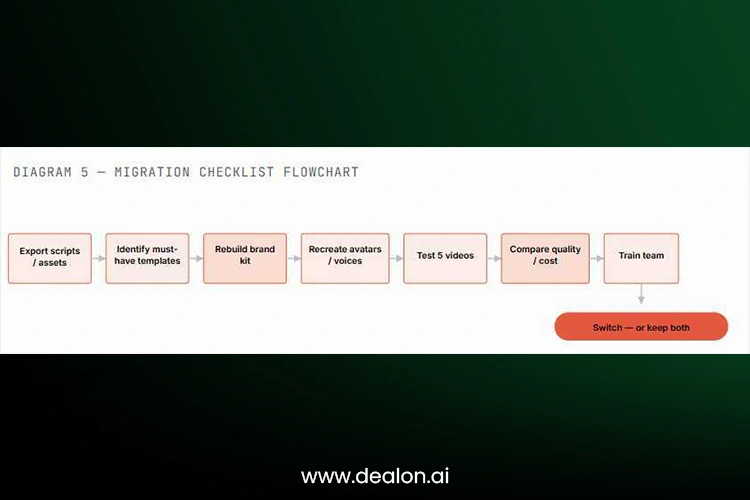
What transfers easily: scripts, subtitles, brand colors, logos, and voiceover text — anything that lives outside the platform as a document or asset file. What does not transfer easily: avatars, templates, custom voices, interactive elements, analytics history, and review history — these are typically rebuilt from scratch on the new platform.
A safer approach than a hard cutover is running both tools in parallel for 30 days, recreating the same 10 sample videos on each, and comparing cost and quality side by side before training the wider team and making a final call.
The “use both” workflow — when one tool isn’t the answer
Many teams shouldn’t be asking “HeyGen or Synthesia?” at all. The better question is: which tool should own which video workflow?
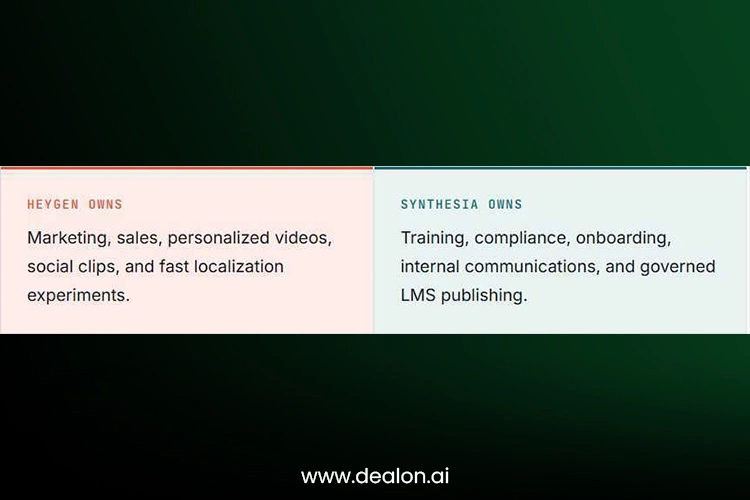
A common pattern: use HeyGen to test campaign messaging quickly, since creative iteration is cheap and fast there. Once a message is proven, rebuild the approved content in Synthesia as standardized training or internal communication, where governance and consistency matter more than speed.
Decision Checklist Before Choosing a Platform
Before making the final decision, teams should use a simple checklist to decide whether HeyGen or Synthesia fits their workflow better. This prevents the decision from being based only on avatar appearance or entry-level pricing.
Determine what kind of videos the team will be making the most of. If the primary intent is marketing, sales outreach, product demos, social media clips, or tailored campaigns, HeyGen will probably be the better option. Synthesia would be a better option if the primary use is employee training, compliance training, onboarding, internal communications, or formal learning content.
Inquire about the number of people who will be using the platform. HeyGen might be easier for one creator or a small marketing team that requires speedy results. For departments that require multiple template usage, workflow management, brand consistency, and structured production, Synthesia might be a better solution.
Reflect on the significance of governance. If you’re making a marketing video for the fun of it, it might be more important to be fast and creative. If the content is regulated, or it is training for the internal staff, or it is meant for executive communication, then there are more approvals, permissions, and security documents relevant.
Test the same script on both platforms. This is one of the best ways for a fair comparison of quality. The same script needs to be used, the same avatar style, the same language, and the same type of video. Then look at how realistic it is, the editing experience, the render time, brand fit, and overall quality of output.
Finally, work out the overall cost of the usage per month. Support minutes, credits, seats, translations, custom avatars, review time, and integrations. Although the less expensive platform may be on paper, it may not be the less expensive platform with the entire workflow.
Final verdict — HeyGen vs Synthesia in 2026
| Category | Winner |
| Best for marketing | HeyGen |
| Best for sales outreach | HeyGen |
| Best for training | Synthesia |
| Best for enterprise governance | Synthesia |
| Best for localization | Tie / depends |
| Best for fast production | HeyGen |
| Best for LMS workflows | Synthesia |
| Best overall for creators | HeyGen |
| Best overall for companies | Synthesia |
Choose HeyGen if your priority is speed, creative flexibility, personalized avatars, marketing videos, sales outreach, social clips, and broad localization reach. Choose Synthesia if your priority is enterprise training, L&D, compliance, governance, brand consistency, LMS workflows, and structured team collaboration. Use both if your organization has both marketing-led video creation and enterprise training needs — which, for most mid-size and larger companies, it does.
Neither platform is objectively “better” across every dimension, and the HeyGen vs Synthesia comparison ultimately comes down to matching the tool to the workflow, not picking a single winner and forcing every video through it.
Frequently asked questions
Is HeyGen better than Synthesia?
It depends on the workflow. In the HeyGen vs Synthesia comparison, HeyGen tends to win for fast, creative, personalized video production, while Synthesia tends to win for structured enterprise training and compliance content.
Is Synthesia better for enterprise teams?
Synthesia generally positions itself more strongly for enterprise governance, brand control, and audit-friendly training workflows, which is why many L&D and compliance teams lean toward it.
Which is better for training videos, HeyGen or Synthesia?
Synthesia is usually the stronger pick for training videos because of its structured templates, SCORM export, and review workflows built for repeatable learning content.
Which is better for marketing videos?
HeyGen is generally better suited to marketing videos, thanks to faster creative iteration, flexible avatars, and social-friendly output formats.
Can HeyGen and Synthesia create custom avatars?
Yes. Both platforms support custom or personal avatars on qualifying plans, though consent, processing time, and usage rights should always be reviewed before creating one.
Which tool is better for video translation and dubbing?
Both are strong here. HeyGen’s pricing page cites 175+ languages and dialects, while Synthesia cites 160+ languages and voices with AI dubbing, so the better fit depends on your specific language list and review process.
Is HeyGen cheaper than Synthesia?
Entry pricing is broadly comparable, but total cost depends on minutes, credits, seats, and translation usage rather than the sticker price of the plan alone.
Does Synthesia support SCORM and LMS export?
Yes, Synthesia lists SCORM export among its enterprise features, which is a key reason L&D teams favor it for learning management system delivery.
Are HeyGen and Synthesia safe for business use?
Both provide enterprise security certifications like SOC 2 Type II and GDPR compliance; however, regulated teams are advised to check for the latest security certifications, consent policies, and handling before taking them on board for the organization.
Should my team use both HeyGen and Synthesia?
Many teams benefit from using both: HeyGen for fast marketing and sales content, and Synthesia for governed training and internal communication, rather than forcing one tool to do both jobs.



