

Generative automation is what happens when a language model stops answering questions and starts running your business processes — and most teams find out how it fails only after it already has.
Use case: A mid-sized company implements an AI workflow to receive incoming support tickets, automatically draft a response, update the CRM record, and provide refunds below a certain amount. The pilot, tested on 40 tickets by two attentive engineers, appears to work well. Three weeks after the workflow goes live, however, the situation changes. Some customers receive refunds they are not entitled to, the monthly model bill triples, unrelated CRM fields are accidentally erased, and support managers can no longer explain why individual tickets were resolved.
Nobody can point to a single bad prompt. The failure wasn’t a lapse in intelligence — it was a workflow with no boundaries, no validation layer, no spending limit, and no named owner. That is the pattern behind almost every expensive generative automation failure. This guide starts from a different premise than most AI content on the internet:
Generative automation does not fail a lot because the language model is not intelligent enough. More often, the actual reasons are poor workflow design, weak boundaries, missing validation, and unclear ownership. This blog delivers a practical guide rather than another hype-driven discussion. You will learn about generative automation, the reason why the ten most common production failures occur, how to develop a nine-stage workflow architecture, and how to move from pilot to production through a 30-day plan.
Also Read: HeyGen vs Synthesia in 2026: Definitive AI Video Tool Comparison
Table of Contents
The Generative Automation Safety Checklist
If you read nothing else, read this. Every mistake covered later in this guide traces back to one of these seven rules being skipped.
- Fix the process before you automate it. AI accelerates whatever process you give it — including a broken one.
- Match autonomy to risk. The more expensive a mistake would be, the less independent authority the workflow should have.
- Treat model output as untrusted until it’s validated — every time, not just during the pilot.
- Limit every agent’s tools, data access, permissions, and spending, by default and in writing.
- Do not add human review to every minor action, just to the decisions that carry actual importance.
- Document every decision, action, cost, and workflow version so failures can be traced, analyzed, and reproduced.
- Design rollback and recovery before deployment, not while an incident is unfolding.
| Workflow type | Example | Recommended autonomy | Human review | Main risk |
| Low-risk content support | Summarizing internal notes | High | Sampling only | Inaccurate summary |
| Customer communication | Drafting support responses | Medium | Before sensitive replies | Brand and factual errors |
| Data modification | Updating CRM records | Medium-low | Exception-based approval | Record corruption |
| Financial action | Refunds, payments, and purchasing | Low | Mandatory approval | Direct financial loss |
| Legal or compliance decision | Contract approval, eligibility | Very low | Specialist approval | Regulatory exposure |
Table 1 — Generative Automation Decision Matrix
What Is Generative Automation?
The term gets used loosely, which is part of why workflows built under its banner go wrong. It isn’t a synonym for “AI agent,” and it isn’t the same thing as robotic process automation with a chatbot bolted on. Here’s a definition that holds up in production:
Generative automation combines generative AI with workflow logic, tools, APIs, data sources, and automated actions so that a system can interpret information, generate an output, make a recommendation, or perform a business task.
Traditional rule-based automation and robotic process automation follow predefined instructions using structured inputs. You can depend on these systems as they are reliable, but they can become brittle when real-world situations do not match their predefined rules.
Generative automation sits between those two: it interprets, decides, and acts, with a workflow wrapped around it. An AI agent is one implementation pattern within that space — a component capable of planning its own steps. Agentic automation and fully autonomous workflows describe how much of that planning happens without a human in the sequence.
It helps to think of generative automation as existing across three maturity levels, not a single capability:
Level 1 — AI-assisted work
The model produces a draft — a reply, a summary, a classification — but a person decides whether to use it and performs the action themselves. Risk stays low because a human remains the final checkpoint on every output.
Level 2 — AI-triggered automation
The model’s output — a classification, an extracted value, a generated recommendation — activates a predefined, deterministic workflow. The model decides what happens next; fixed logic decides how it happens.
Level 3 — Agentic execution
The system plans its own steps, selects which tools to call, performs actions, evaluates the results, and decides what to do next without a predefined path. This is where generative automation becomes powerful — and where most of the mistakes in this guide live.
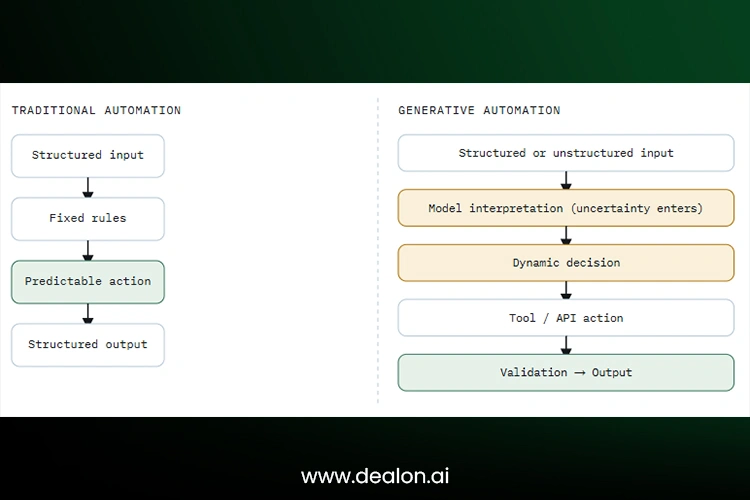
Diagram 01 · Comparison
Why Generative Automation Fails Differently
In a conventional workflow, failure is usually visible: a condition evaluates incorrectly, an API times out, a required field is missing, or a script returns an error. Generative automation changes this because a workflow can appear to be completed successfully while producing the wrong business outcome.
A generative workflow may seem effective on the surface, but it might be failing in practice. It may produce clear but inaccurate responses, select a technically valid yet inappropriate tool, or take the right action in the wrong customer context. It can also be in violation of policies that have not been translated into clear operational guidelines. It can also get caught up in expensive reasoning cycles that don’t add up much, or just because it is said with confidence, the time-constrained reviewer approves of the weak decision.
Probabilistic output
The same input can produce a different answer on a different run. Deterministic testing — run it once, confirm it passes — doesn’t capture this.
Silent failure
The workflow completes end-to-end, with no technical error anywhere in the logs, while the business outcome is wrong.
Automation blast radius
The scope of harm one incorrect AI decision can cause once it’s distributed automatically across customers, systems, records, or transactions — the difference between one wrong answer and ten thousand wrong refunds.
None of this means human approval solves the problem by itself. Reviewers are subject to automation bias — the tendency to trust a system’s output more as its confidence and output volume increase, precisely when scrutiny should go up, not down. A review step that exists on paper but not in practice is not a control.
Automating a Broken Process
AI does not repair unclear ownership, duplicated approvals, inconsistent data entry, or contradictory business policy. It automates whatever process you hand it — including all of that process’s dysfunction, now running at machine speed.
Watch for these warning signs before you write a single prompt:
- Employees perform the same process differently depending on who’s doing it.
- Exceptions outnumber standard cases.
- Nobody owns the outcome — responsibility is diffuse or contested.
- Required data arrives through emails, spreadsheets, and informal Slack messages instead of a system of record.
- The written policy is outdated or contradicts what people actually do.
- The organization can’t currently measure how well the process performs.
Map the existing workflow: Record the current process, triggers, inputs, decision points, systems, people, known exceptions, outcome, and the time and cost of the process. If the team is unable to describe the workflow, it does not yet understand it well enough to automate it safely.
Identify process problems vs. opportunities for AI: Take the example of an invoice-approval workflow that seems slow because document extraction takes too long. A closer examination may show that the real problem is poor purchase-order discipline, with invoices frequently arriving without a valid matching purchase order. There will be no difference in the process with a faster extraction, except that the invoice moves towards an unreliable decision more quickly. Strong data and operational foundations matter more than adding a powerful model to a weak process.
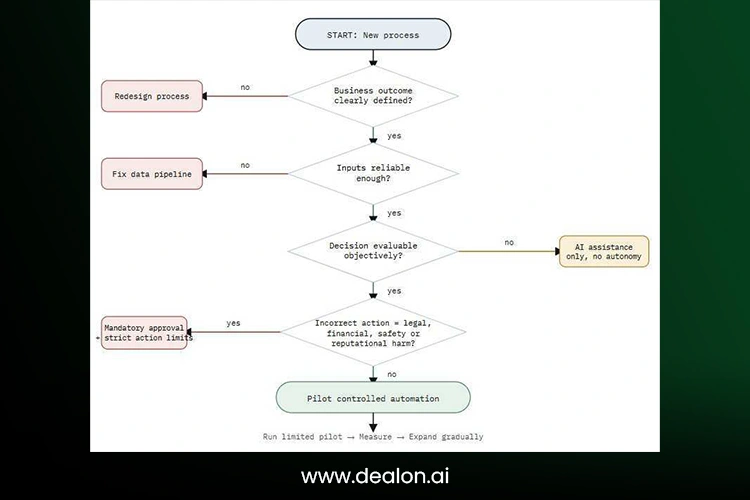
Flowchart 01 · Suitability Check
Choosing Workflows by Hype Instead of Suitability
The most impressive AI demo in the room is rarely the best automation candidate. A model that can plan a multi-step negotiation looks more exciting than one that classifies inbound tickets — but classification is usually where the reliable value is. Negotiation is usually where the expensive mistakes are.
Evaluate each candidate workflow against the following factors, which actually correlate with reliability: volume, repetition, input consistency, output measurability, exception frequency, reversibility, business value, and the cost of an incorrect action.
Generative automation is particularly well-suited to early applications like document classification, internal summarization, forming drafts for human review, extracting data, and searching knowledge bases.
Organizations should exercise caution when applying generative automation, when doing tasks like authorizing automatic payments, providing medical recommendations, and endorsing legal documents, etc. These activities carry significant financial, legal, security, or reputational risks and should continue to be tightly monitored and approved by humans.
| Evaluation factor | 1 pt | 3 pts | 5 pts |
| Input consistency | Highly inconsistent | Partially structured | Standardized |
| Output measurability | Subjective | Partially measurable | Objectively testable |
| Error reversibility | Difficult to reverse | Reversible with effort | Easily reversible |
| Exception rate | Frequent | Moderate | Rare |
| Business value | Low | Moderate | High |
| Risk of incorrect action | Severe | Manageable | Minimal |
Table 2 — Workflow Suitability Scorecard
Scoring: 24–30 → strong automation candidate. 17–23 → pilot with controls. 10–16 → AI assistance only. Below 10 → do not automate yet.
Giving AI a Goal Without Operational Boundaries
“Resolve the customer’s problem” is insufficient when the agent can do tasks like issue refunds, apply discounts, send outbound messages, etc. A production workflow should require more safeguards and structured controls that go beyond a well-written system prompt.
Define the objective
State, in unambiguous terms, exactly what a successful completion looks like — not “help the customer” but “resolve the billing discrepancy within policy or escalate.”
Define prohibited actions
- Don’t give refunds for an amount that exceeds a certain limit.
- Do not share internal notes with unauthorized users or external recipients.
- Do not contact a customer more than once about the same case unless additional communication is required.
- Do not edit, change, or alter identity or payment information.
- Do not interpret or apply legal policy without escalating the case to a qualified reviewer.
Set a stopping criterion: The agent needs an explicit answer to “what happens next” in every direction: complete the task, request more information, escalate to a human, stop after repeated failure, or cancel when a cost or time limit is exceeded. An agent with no stopping condition doesn’t fail gracefully — it just keeps going.
Use structured outputs: Prefer schemas, required fields, enumerated categories, confidence indicators, and citations over unrestricted prose. Structured output is what makes downstream validation possible in the first place.
Adding Human Approval in the Wrong Place
”Human in the loop” doesn’t mean much when the human’s job is to click approve after the AI has already completed the entire workflow and formed a confident conclusion. That’s a rubber stamp with extra steps, not oversight.
It’s worth distinguishing a few flavors of oversight: human in the loop (approval required before an action executes), human on the loop (monitoring in real time, able to intervene), human over the loop (periodic audit of outcomes), and human out of the loop (no ongoing oversight at all — appropriate only for the lowest-risk workflows).
Review decisions, not human review at every minor action: Human approval should protect the decision points that form genuine risk, rather than interrupting every step. Requiring approval too often can orient reviewers to click through requests without proper examination.
Use risk-based review: Low-risk outputs can be sampled after the fact. High-risk actions require direct, pre-execution approval every time.
Give reviewers meaningful evidence: An approval screen that shows a recommendation and an “approve” button invites automation bias. Show the source information, the model’s recommendation, its assumptions, a confidence or uncertainty indicator, the proposed action, the financial or operational impact, the policy applied, and any alternative options considered.
| Action | Approval timing | Reviewer | Evidence required |
| Internal summary | Post-execution sampling | Team lead | Source and summary |
| Customer email | Before sending | Support agent | Original request and draft |
| CRM update | Exception only | Operations owner | Old and proposed values |
| Refund | Before execution | Authorized manager | Policy, amount, customer history |
| Contract decision | Before execution | Legal specialist | Clauses, sources, risk explanation |
Table 3 — Human Approval Placement Matrix
Human approval alone is also not a complete governance strategy. Reviewers can be subject to automation bias, particularly at high volume with confident-sounding output — a dynamic worth designing around explicitly rather than assuming away.
Feeding the Workflow Unreliable Context
A workflow cannot produce dependable actions from stale, conflicting, incomplete, or unauthorized information.
Common culprits: poor document quality, duplicate records, outdated policies, retrieval failures, missing metadata, incorrect document permissions, context-window overflow, irrelevant retrieved passages, and outright conflicts between internal sources that nobody has reconciled.
Validate inputs before generation: Apply format checks, mandatory-field checks, freshness rules, and source-authorization checks before context ever reaches the model — not after.
Treat retrieval as a separate system: Retrieval quality has to be measured independently from model quality. A perfect model given the wrong passages will still produce a wrong answer, and that failure will look identical to a model reasoning error unless you can tell the two apart.
Add a source hierarchy.
- Current approved policy
- Official system of record
- Verified operational documentation
- Historical records
- Unverified user-generated notes
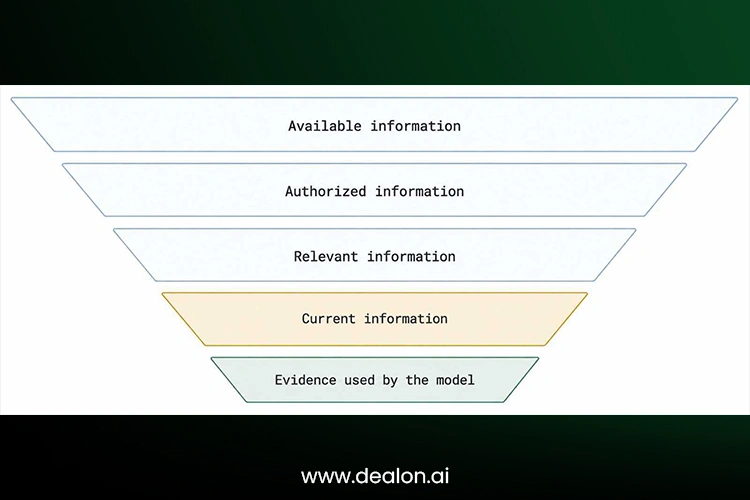
Diagram 02 · Context Quality Funnel
Trusting Generated Output Without Validation
Fluent output is not the same thing as verified output — a distinction that’s easy to state and surprisingly easy to forget under deadline pressure.
Deterministic validation
Use plain software rules for anything that has an objectively correct answer: required fields, data types, totals, date ranges, email formats, product codes, transaction limits, policy thresholds.
Model-based evaluation
A second model can usefully evaluate relevance, completeness, policy alignment, or tone — but it should never be the only control. A model checking a model shares failure modes with the thing it’s checking.
Ground-truth testing
Maintain a set of manually verified examples and re-run the workflow against them regularly as a regression test.
Business-outcome validation
Measure whether the workflow produced the correct operational result — not whether the response merely sounded plausible. Model performance also varies considerably across tasks and datasets, which is exactly why task-specific validation matters more than a general benchmark score ever will.
Giving Agents Excessive Access
Excessive permissions are among the most overlooked risks in generative automation because they often remain invisible until the workflow causes real damage. Warning signs include shared administrator accounts, overly broad API credentials, unrestricted access to unrelated customer data, unlimited outbound messaging, unrestricted permission to create or delete records, production access during testing, and tools that can call other tools recursively without a depth limit.
Apply least-privilege access
Give every workflow a unique identity and a narrowly scoped set of permissions — never a shared credential borrowed from a person or another system.
Separate reading from writing
An agent that only needs to inspect an order should not automatically have permission to modify or refund it. Treat read and write permissions as separate grants.
Use transaction limits
Establish daily limits on the number of records an agent can modify, messages it can send, transactions it can complete, tools it can call, and money it can spend. These relatively inexpensive controls can prevent a malfunctioning workflow from creating widespread damage before anyone notices.
Measuring Subscription Price Instead of Workflow Cost
Model pricing is one line item in a much longer bill. The full cost of a generative automation workflow includes input tokens, output tokens, retrieval queries, embeddings, reranking, agent loops, API calls, database operations, human review time, failed retries, monitoring infrastructure, engineering maintenance, incident remediation, and vendor platform fees.
The cost of unnecessary autonomy
A simple classification task can quietly become expensive the moment an agent is allowed to plan, search, call multiple tools, critique its own output, and retry — each of those is a reasonable capability in isolation. Together, they can turn a one-call task into a twenty-call one.
Cost per successful outcome
The metric that matters isn’t total spend — it’s spend per correct result:
Cost per successful outcome = Total workflow cost ÷ Number of correctly completed outcomes
Add workflow budgets
Establish limits because, without a defined budget, a workflow can gradually turn a simple task into an unnecessarily expensive process.
| Cost category | What to measure | Common mistake | Recommended control |
| Model usage | Tokens and calls per run | Tracking only monthly spend | Cost per workflow outcome |
| Agent loops | Repeated planning and retries | Unlimited self-correction | Hard iteration limit |
| External tools | API and search calls | Ignoring third-party fees | Per-tool budget |
| Human review | Minutes per exception | Treating review as free | Fully loaded labor cost |
| Failures | Rework and remediation | Excluding incident cost | Failure-cost reserve |
| Maintenance | Prompt and integration updates | Counting only development | Monthly ownership estimate |
Table 4 — Hidden Generative Automation Cost Model
Operating Without Observability
Standard uptime monitoring tells you the workflow is running. It tells you nothing about whether it’s making good decisions — those are two completely different questions, and only one of them shows up on a status page.
A production system should record, at minimum: input source, retrieved context, prompt version, model and model version, generated response, tool selected, tool arguments, action result, validation result, reviewer decision, latency, token usage, cost, error category, and final business outcome.
Monitor quality, not only availability: Track task success rate, escalation rate, human override rate, unsupported-claim rate, validation-failure rate, cost per successful outcome, average tool calls, retry rate, and customer correction rate.
Detect drift: Prompt drift, data drift, and policy drift accumulate quietly. So do tool changes, integration changes, and model-version changes upstream of your workflow — any of which can shift behavior without anyone touching your code.
Version the complete workflow: Don’t version only the prompt. Version the prompt, the model, the tools, the knowledge sources, the business rules, the validation logic, and the workflow graph together so that any behavior change can be traced to a specific, reproducible configuration.
Creating Agent Sprawl
Agent sprawl is the uncontrolled growth of AI agents, prompts, tools, integrations, and overlapping responsibilities across an organization. It tends to arrive gradually, one well-intentioned addition at a time, until nobody can draw the full picture anymore.
Warning signs: multiple agents perform the same task in slightly different ways; nobody can say which workflow owns a given decision; agents pass long unstructured messages to one another; every new process gets its own dedicated model instead of reusing an existing one; tools get duplicated across platforms; business rules live inside prompts instead of code; and an agent needs a second agent to interpret the first agent’s output.
Prefer the simplest workable architecture.
- One model call before reaching for multiple agents
- Deterministic code before model reasoning
- A fixed workflow before dynamic planning
- One responsible agent before an agent team
Choose an orchestration pattern deliberately.
Sequential, parallel, router, handoff, and supervisor-worker patterns solve different problems — they aren’t interchangeable defaults. Current architecture guidance treats sequential, concurrent, group-based, and handoff patterns as distinct design decisions, each with different failure modes and observability requirements, rather than as flavors of the same thing.
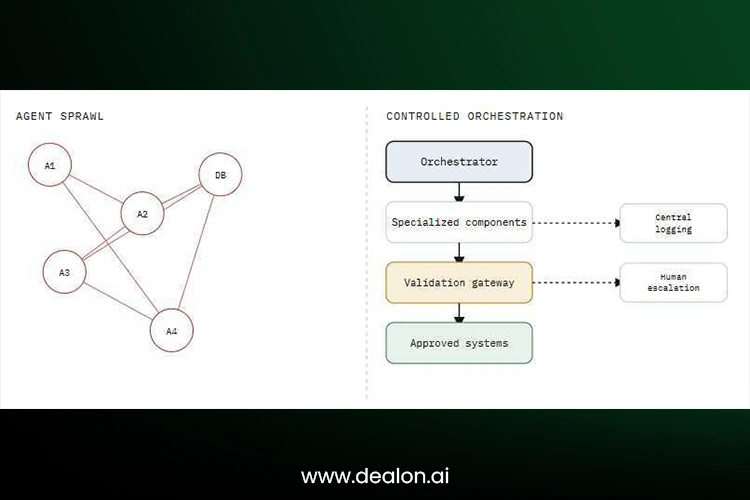
Diagram 03 · Sprawl vs. Orchestration
The Production-Ready Generative Automation Blueprint
Every reliable generative automation workflow, regardless of industry, resolves into the same nine stages: trigger, input validation, authentication and authorization, context retrieval, model reasoning or generation, tool execution, output validation, human approval or exception handling, and logging/monitoring/outcome measurement.
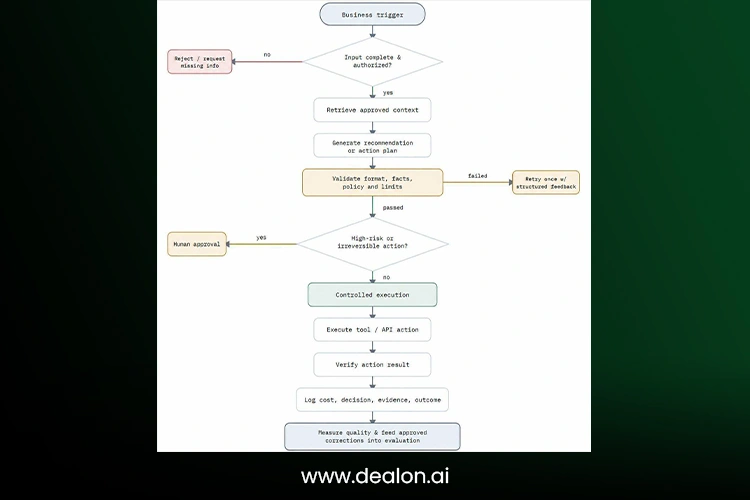
Flowchart 02 · Production Architecture
Build a Failure Budget Before You Build the Workflow
A failure budget is the maximum acceptable level of incorrect, delayed, escalated, or costly workflow outcomes — decided in advance, in writing, before the workflow ever touches a live customer or record.
Before launch, the team should establish clear thresholds for different parameters like the acceptable error rate, maximum financial exposure, etc., and the conditions that will automatically suspend the workflow.
Calculate the workflow’s blast radius: Assess how many people are affected, how many systems are touched, how much financial value is under the workflow’s control, how reversible its actions are, how regulatory-sensitive the domain is, and how quickly an error can spread before anyone notices.
Use circuit breakers
- Stop after five consecutive validation failures.
- Suspend refunds automatically after an abnormal approval spike.
- Disable outbound emails when complaint rates rise.
- Route all cases to humans if the underlying model provider changes.
- Fall back to a rules-based workflow during an outage.
Testing Generative Automation Before Production
A successful demo, run once, on cases someone chose, is not a production test. It’s a proof of concept — useful, but not evidence of reliability.
Golden-set testing
Use a set of manually verified, representative cases as the baseline; every version must pass.
Edge-case testing
Include incomplete, contradictory, malicious, outdated, multilingual, and simply unusual inputs — the cases that never show up in a curated demo.
Adversarial testing
Test prompt injection, data-exfiltration attempts, unauthorized actions, tool misuse, and attempts to talk the workflow around its own policy.
Shadow mode
Let the workflow generate recommendations without taking action, and compare its decisions against what a human actually decided in the same cases.
Limited rollout
Expand the rollout gradually—from internal users to one team, one customer segment, and one workflow category—while maintaining low financial thresholds until sufficient performance evidence has been collected.
Regression testing
Re-run the full evaluation suite whenever the model, prompt, tool, data source, or policy changes. Any one of those changes is enough to shift behavior.
What to Do When an AI Workflow Fails
Treat a generative automation failure as an incident to be contained and investigated, not a bug to be quietly patched.
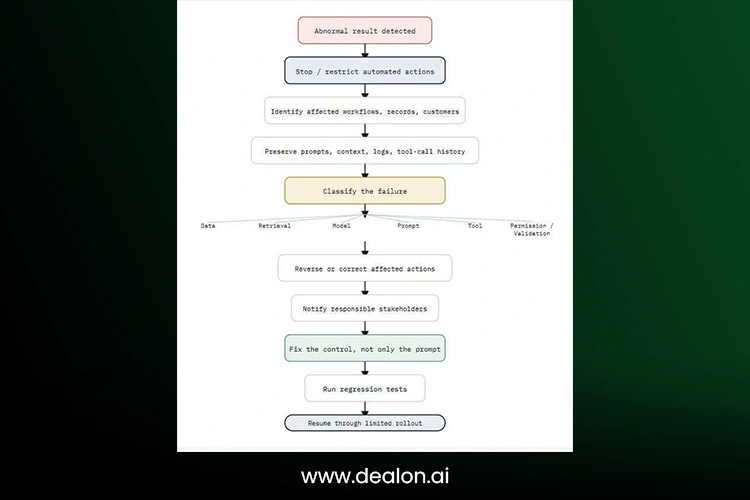
Flowchart 03 · Incident Response
From Pilot to Scale — A 30-Day Rollout Framework
Week 1 — Understand the process and risks.
Study the workflow, assign responsibilities, identify exceptions, assess the possible impact of failures, and set clear goals to measure success.
Week 2 — Build and test the prototype.
Before the first live run, specify the data that can be used, restrict access to tools and permissions, prepare structured outputs, create tests, and set budget limits.
Week 3 — Test alongside human work
Compare AI with human decisions, record errors, test unusual situations, and estimate the cost of successful results in normal conditions.
Week 4 — Start with limited use
Start with low-risk activities, make escalation easy and transparent, review mistakes and overrides daily, and add more to the system when it has proven itself to be of the required quality.
| Category | Key question | Ready standard |
| Process | Is the workflow documented and owned? | Owner, trigger, steps, and exceptions defined |
| Data | Are sources approved, current, and traceable? | Source controls and freshness rules are active |
| Security | Does the workflow have minimum access? | Unique identity, restricted permissions |
| Validation | Can incorrect output be detected? | Automated checks plus test set |
| Human oversight | Are high-risk actions reviewed? | Approval matrix implemented |
| Cost | Are spending and retries limited? | Per-run and monthly budgets |
| Monitoring | Can every action be reconstructed? | End-to-end logs and alerts |
| Recovery | Can actions be stopped or reversed? | Kill switch and rollback procedure |
| Governance | Is accountability documented? | Named business and technical owners |
Table 5 — Production Readiness Scorecard
Scoring: 8–9 categories ready → limited production launch. 6–7 → continue controlled pilot. 4–5 → major controls missing. 0–3 → do not deploy.
The Future of Generative Automation Is Controlled Autonomy
The goal was never maximum autonomy. Each mistake in this guide reflects the same flawed assumption: that removing friction means a workflow is ready for autonomous operation.
Generative automation is successful when AI is sufficiently free to deal with variation, but sufficiently constrained to avoid uncertainty as a cause of operational damage.
Before you ship the next workflow, identify its owner, its failure budget, its approval boundary, its validation layer, and its kill switch. If any of those five things are missing, the workflow is still a demonstration — not a production system.
Frequently Asked Questions
What is generative automation?
Generative automation is the use of generative AI within a workflow — connected to tools, APIs, and data sources — so the system can interpret information, generate a recommendation, or perform a business action, rather than simply producing text for a person to read and act on manually.
How is generative automation different from traditional automation?
Traditional automation follows predefined rules, usually processes structured inputs, and produces predictable outcomes. Generative automation can interpret unstructured information and make context-dependent decisions, making it more flexible but also less predictable and more difficult to validate.
What is an example of generative automation?
A customer-support workflow that reads an incoming ticket, classifies its intent, drafts a reply, updates the CRM record, and — within a defined threshold — issues a refund, is a typical example. Invoice processing that extracts data, matches it to a purchase order, and routes exceptions for approval is another.
What are the biggest risks of generative automation?
The most common risks are inaccurate or hallucinated output, unauthorized actions from excessive permissions, exposure of sensitive data, hidden and escalating costs, weak governance and unclear ownership, and small errors being distributed automatically across many customers or records at once.
Should every AI workflow include a human in the loop?
Not necessarily, and not in the same way. The right level and placement of human review depends on the risk of the action, how reversible it is, and its business impact — low-risk workflows can rely on sampling. In contrast, irreversible or high-value actions warrant mandatory pre-execution approval.
How much does generative automation cost?
Beyond model subscription or API pricing, real cost includes token usage, retrieval and embedding calls, agent-loop retries, third-party API and tool fees, human review time, engineering maintenance, and incident remediation — which is why cost per successful outcome is a more useful metric than total monthly spend.
Can generative automation work without AI agents?
Yes. Many dependable production workflows combine a single, well-scoped model call with deterministic automation and validation logic, rather than an autonomous multi-step agent — and this simpler pattern is often more reliable and easier to govern for well-defined tasks.
How do you test a generative AI workflow?
Test against a manually verified golden dataset, intentionally feed in edge cases and adversarial data, perform a “shadow run” of the workflow against human decision making before allowing it to make decisions, use a limited deployment to test it, and run the full evaluation suite as a regression test whenever any component is modified.
When should a company avoid generative automation?
Avoid it for processes that are high-risk, poorly defined, difficult to measure objectively, built on unreliable or fragmented data, or hard to reverse once an action is taken — these are the conditions under which AI is most likely to fail expensively and least likely to fail visibly.



