
Table of Contents
What Are Agentic Workflows?
Agentic workflows are AI-powered systems where autonomous agents can analyze goals, make decisions, use tools, collaborate, and complete tasks with minimal human intervention.
That’s the one-sentence version. The longer version is that agentic workflows represent a shift in what software is asked to do. Instead of following a fixed script — do A, then B, then C — an agentic workflow is handed an outcome and works out its own path to get there, adjusting when something doesn’t go as planned. It plans, it acts, it checks its own work, and in many implementations, it tries again when the first attempt falls short.
The difference sounds small on paper and turns out to be enormous in practice. A traditional automation breaks the moment reality deviates from the script. Agentic workflow regards that deviation as a problem that is to be solved, not a failure to stop on.
| Category | Traditional automation | Agentic workflow |
| Decision-making | Rule-based | AI reasoning-based |
| Human involvement | Required at every step | Human oversight, not micromanagement |
| Adaptability | Low — breaks on edge cases | High — reroutes around obstacles |
| Learning ability | Limited to what was coded | Continuous improvement over time |
| Task complexity | Simple, linear workflows | Multi-step, branching processes |
Table 1 · Agentic workflows at a glance
Who should care?
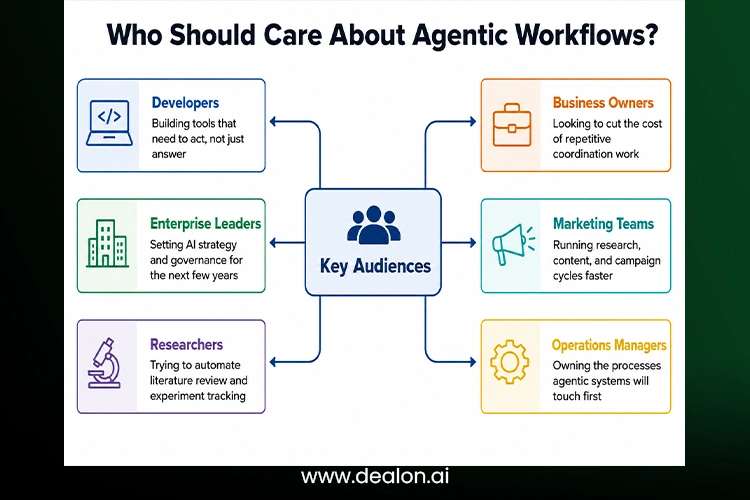
Fig. 1 — Key Audiences for Agentic workflows
None of these groups needs to become AI specialists to benefit. What they need is a working mental model of what an agentic workflow can and can’t be trusted to do on its own, and where a checkpoint still belongs. That’s the gap this guide is built to close — starting from first principles and ending with a practical rollout plan.
Also Read: Generative Automation: The Definitive Guide to Avoiding Costly AI Workflow Mistakes in 2026
The Core Concept: From Automation to Autonomous Intelligence
Every generation of workplace software has quietly raised the amount of judgment it’s trusted to exercise. Agentic workflows are simply the latest — and biggest — step up that ladder.
Rule-based systems could only do what they were told, in exactly the order they were told. Robotic Process Automation took this further by automating tasks across different screens and spreadsheets. Generative AI assistants added language and reasoning to the mix, but for years, they mainly answered questions instead of taking action.
Autonomous AI agents close that gap: they can read a goal, decide what needs to happen, and actually do it, using software the same way a person would. Agentic workflows are what you get when you connect several of these agents — or one agent working across several tools — into a coherent process aimed at a business outcome, not just a single response.
It helps to remember how recent this jump is. Rule-based systems have existed since the earliest business software — reliable, cheap to run, and completely unable to handle anything outside the cases their authors anticipated. RPA, popular through the 2010s, made those rules easier to apply across legacy interfaces, but a redesigned webpage or an unexpected pop-up could still stop a bot cold.
Generative AI assistants changed the conversation by giving software actual language understanding, but for a long stretch that understanding stayed locked inside a chat window — useful for drafting and explaining, not for doing. Agentic workflows are the first stage where the software’s judgment and its ability to act arrive together.
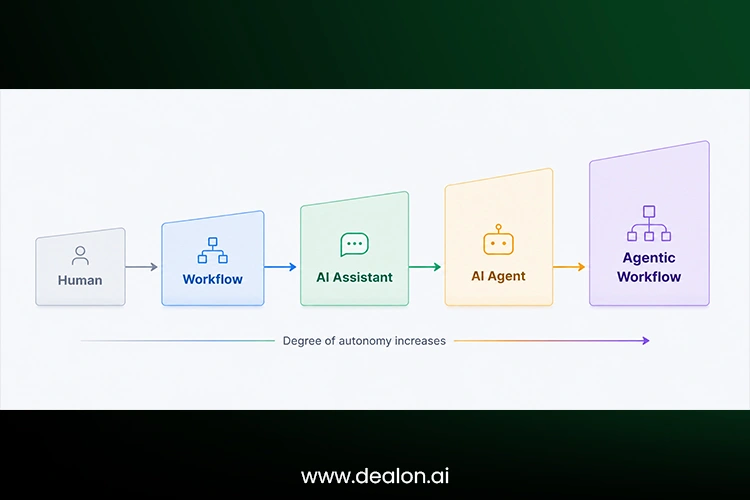
Fig. 2 — Manual work to autonomous systems, five stages
Each stage in that progression didn’t replace the one before it. Most real businesses run all five at once: some processes are still manual, some are automated with simple rules, some lean on an assistant for drafting, and a growing slice is handed to an agent that can carry a task from start to finish.
How Agentic Workflows Actually Work: The AI Agent Loop
Underneath the term “agentic” is a fairly simple, repeating cycle. Almost every agent framework in production today is a variation on the same five moves.
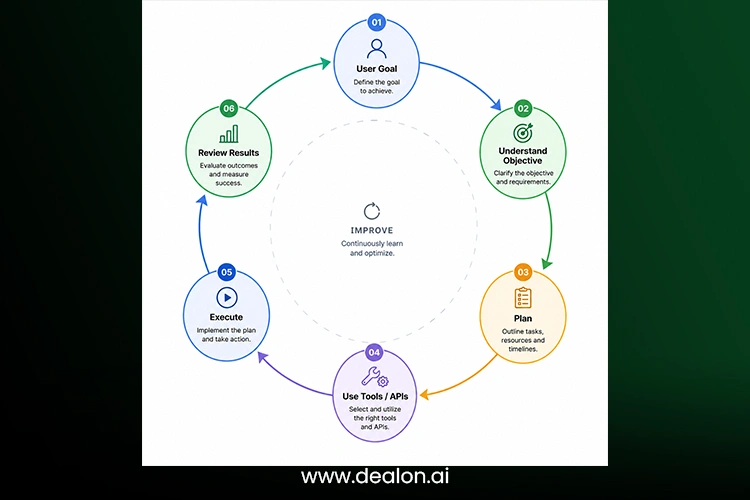
Fig. 3 — The agent loop: a cycle, not a single pass
1. Goal understanding: The agent parses what “done” actually looks like — the real objective behind the instruction, including constraints the user didn’t spell out.
2. Planning: It breaks the goal into an ordered set of sub-tasks, choosing an approach rather than following a pre-written script.
3. Tool usage: It calls the APIs, databases, or software it needs — search, code execution, a CRM, a spreadsheet — to gather information or take action.
4. Execution: It carries out the plan step by step, adjusting the order or method as new information comes in.
5. Evaluation and improvement: It checks the outcome against the original goal, and if it fell short, revises the plan and tries again — the loop closes and, if needed, restarts.
The step that separates this from traditional automation is the last one. A scripted workflow has no concept of “did this actually work” — it just runs the next line of code. An agent evaluates its own output and treats a bad result as new information, not a dead end.
That loop can run in seconds for a simple lookup, or stretch across many iterations for something like debugging a failing test suite, where the agent tries a fix, reruns the tests, sees what’s still broken, and adjusts its plan before trying again. The number of loops isn’t fixed in advance — it’s determined by how far the current state is from the goal, which is precisely the flexibility a hard-coded script can’t offer.
The Architecture Behind Agentic Workflows
”Agent” is a behavior, not a single piece of software. Behind that behavior sit four building blocks that show up in nearly every implementation.
It’s worth separating the model from the system built around it, because the two get conflated constantly in vendor marketing. The model provides reasoning. Everything else on this list — memory, tools, orchestration — is infrastructure that turns that reasoning into something that can actually complete a job in the real world, remember what happened last time, and stay within its assigned boundaries.
The AI brain — foundation models: The reasoning engine is typically a large language model, sometimes paired with a multimodal model for images or a specialized reasoning model tuned for longer chains of logic. This is what turns a goal into a plan.
Memory systems: Agents need to remember more than fits in a single prompt. Short-term memory holds the current task’s context; long-term memory — often a vector database — stores facts, past interactions, and documents the agent can retrieve when relevant, so it doesn’t start from zero every time.
Tools and APIs: This is how an agent touches the world: web search for current information, databases for records, software tools for execution, and business applications like a CRM or a ticketing system. Without tools, a model can only talk about doing something. With them, it can actually do it.
Orchestration layer: When more than one agent is involved, something has to route tasks, coordinate handoffs, and monitor what’s happening. The orchestration layer is the traffic control system sitting above the individual agents — deciding which agent goes next, catching failures, and logging what happened for later review.
| Component | Function | Example |
| AI model | Reasoning engine | GPT, Claude, Gemini |
| Memory | Stores context | Vector database |
| Tools | Performs actions | APIs |
| Planner | Creates strategies | Task decomposition |
| Executor | Performs actions | Software agents |
Table 2 · Components of an agentic workflow
None of these pieces is new on its own — models, databases, and APIs have existed for years. What’s new is wiring them together so the model itself decides when to reach for which one.
Agentic Workflows vs. Traditional Automation: The Real Difference
It’s tempting to treat agentic workflows as “automation, but smarter.” The more useful framing is that they solve a different problem: automation executes a known path; agentic workflows find a path.
| Feature | Traditional automation | Agentic workflow |
| Logic | Fixed rules | Dynamic reasoning |
| Errors | Stops the workflow | Attempts recovery |
| Planning | Human-designed | AI-generated |
| Adaptation | Minimal | Continuous |
| Complexity | Limited to linear steps | Handles multi-step, branching work |
Table 3 · Automation vs. agentic workflows
In practice, the strongest systems combine both. Predictable, high-volume steps stay on rigid rails because that’s cheaper and more reliable. The parts of a process that require judgment — reading an ambiguous email, deciding which of three vendors fits a request, catching an exception a script would choke on — go to the agent.
Real-World Examples of Agentic Workflows in 2026
The clearest way to understand agentic workflows is to see what they’re already doing across industries.
Software development agents: Writing code from a spec, running and interpreting test suites, tracking down the source of a bug, and managing routine parts of a deployment pipeline — with a human reviewing the pull request rather than typing every line.
Marketing agents: Running market and competitor research, drafting content across formats, and adjusting campaign spend based on performance data without waiting for a weekly reporting cycle.
Customer support agents: Reading a complaint, identifying the likely cause, searching a knowledge base or past tickets for a fix, and updating the CRM record — escalating to a human only when the situation calls for judgment, a policy doesn’t cover.
Business operations agents: Pulling data from multiple systems, building recurring reports, and handling scheduling logistics used to eat up a coordinator’s whole morning.
Research agents: Running literature reviews across large document sets, assembling datasets, and drafting experiment plans that a researcher then refines rather than starts from scratch.
What’s notable about 2026’s deployments compared to just a couple of years earlier isn’t any single use case — it’s the breadth. Agentic workflows have moved from isolated pilots in software teams to something operations, finance, and HR departments are now testing on their own, often through the low-code builders bundled into tools those teams already use.
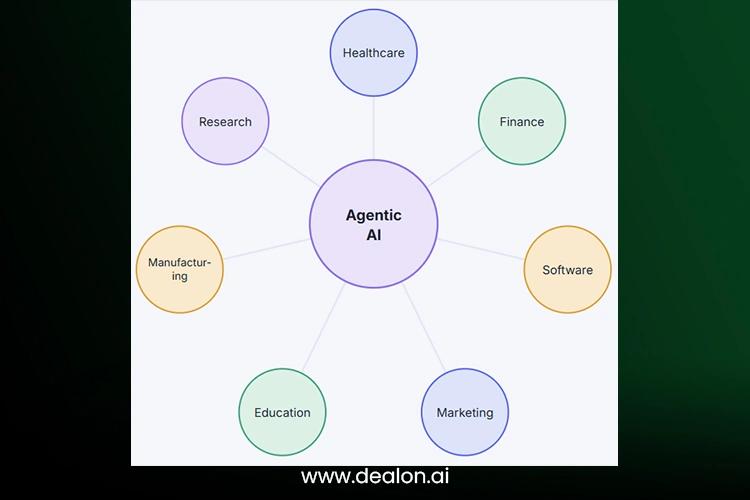
Fig. 4 — Agentic AI reaches across every function, not just IT
Multi-Agent Systems: When AI Agents Work Together
A single agent is fine for a contained task. Complex work — the kind with distinct phases requiring different skills — tends to go better when it’s split across specialized agents that hand off to each other.
A typical content workflow may include several agents, such as research, data, writing, and review agents. This approach divides a complex process into smaller, specialized roles. Everyone is responsible for the task that they are best suited for, and the review stage helps to catch errors and guarantee that the final content is in line with the original requirements.
| Feature | Single agent | Multi-agent |
| Tasks | One objective at a time | Complex, multi-phase projects |
| Collaboration | None | Multiple specialized AI roles |
| Speed | Moderate | Faster through parallel execution |
| Accuracy | Good | Higher, with built-in verification |
Table 4 · Single agent vs. multi-agent workflow
The trade-off is coordination cost. More agents mean more handoffs, more places for context to get lost, and a real need for the orchestration layer described earlier. Multi-agent systems earn their complexity from genuinely multi-phase work — they’re overkill for a task one agent can finish cleanly.
A useful rule of thumb: reach for multiple agents when the task has natural role boundaries that a human team would also split up — research versus writing versus review — and stick with one agent when the work is really a single skill applied repeatedly.
Human-in-the-Loop vs. Fully Autonomous Workflows
Autonomy is a dial, not a switch. Most organizations move along it gradually, and the right setting depends entirely on how costly a mistake would be.
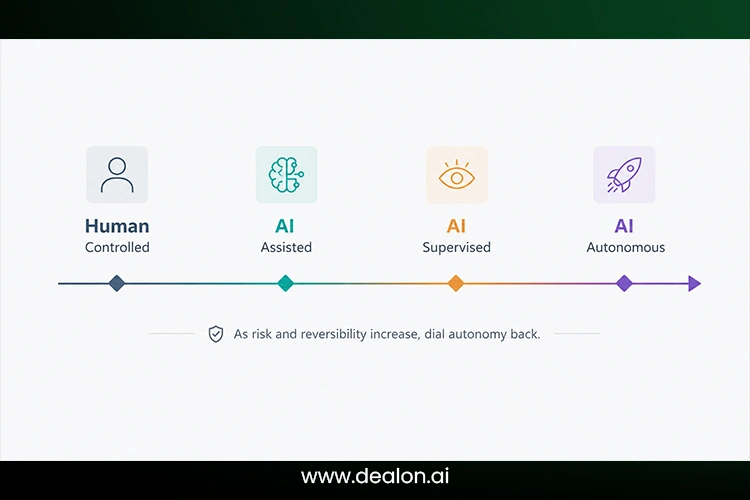
Fig. 5 — The autonomy spectrum
Level 1 — AI assistant: suggests, drafts, and answers, but a person initiates and approves every action. Level 2 — AI agent with approval: the agent plans and prepares an action, but a human signs off before anything irreversible happens. Level 3 — fully autonomous system: the agent acts within a defined scope without per-action approval, usually reserved for low-stakes, well-bounded, easily reversible tasks.
The organizations getting the most value aren’t racing to Level 3 everywhere. They’re matching the level to the stakes — full autonomy for a routine data pull, an approval gate for anything that touches money, customers, or production systems.
A support team might let an agent draft and send replies to routine questions on its own, while requiring sign-off before it issues a refund. A finance team might let an agent reconcile transactions autonomously, while keeping a human in the loop for anything above a set dollar threshold. The rule is the same for all functions: autonomy scales with how easily a mistake can be caught and undone.
Agentic Workflow Tools and Platforms in 2026
The tooling ecosystem splits roughly into three layers: frameworks for developers, platforms for enterprises, and lighter developer-facing building blocks.
AI agent frameworks
- LangGraph — graph-based orchestration for complex agent logic.
- AutoGen — conversational multi-agent experimentation.
- CrewAI — role-based multi-agent collaboration.
- Semantic Kernel — agent orchestration built for enterprise .NET and Python stacks.
Enterprise platforms
- Salesforce Agentforce — agents embedded in CRM workflows.
- Microsoft Copilot Studio — low-code agent building across the Microsoft stack.
- Google Vertex AI Agent Builder — managed infrastructure for production agents.
Developer tools
Beyond named platforms, most teams also lean on open-source agent frameworks and direct API-based agent construction when they need full control over behavior and cost.
| Platform | Best for | Strength |
| LangGraph | Developers | Agent orchestration |
| CrewAI | Multi-agent systems | Collaboration |
| AutoGen | Research | Experimentation |
| Copilot Studio | Enterprise | Business automation |
Table 5 · Agentic workflow platforms compared.
Choosing between them usually comes down to who’s building and how much control they need. Teams with engineering resources tend to prefer open frameworks like LangGraph or CrewAI, which expose every part of the loop for customization. Teams without a dedicated AI engineering function generally get further, faster, with a managed enterprise platform that trades some flexibility for built-in governance, monitoring, and support.
Building Your First Agentic Workflow: Step-by-Step
You don’t need a large engineering team to get a first agentic workflow into production. A narrow, well-scoped starting point beats an ambitious one that never ships.
| 1 | Define the goal Pick one outcome, stated in plain terms — “triage inbound support tickets,” not “improve customer experience.” |
| 2 | Identify required tools List the systems the agent will need to read from or act on — a helpdesk, a CRM, a knowledge base. |
| 3 | Design agent roles Decide whether one agent handles the whole task or whether it splits cleanly into specialized roles. |
| 4 | Create workflow logic Map the plan-tool-execute-evaluate loop onto your specific process, including what “success” looks like. |
| 5 | Add human checkpoints Put an approval gate anywhere a mistake would be costly or hard to reverse. |
| 6 | Monitor performance Track accuracy, cost, and how often the agent needs human correction, then tighten the scope or the prompts accordingly. |
Fig. 6 — A beginner roadmap from idea to a live workflow
The most common first-project mistake is scoping too broadly — trying to automate an entire department’s workflow instead of one clearly bounded task within it. A narrower pilot is easier to test, easier to explain to stakeholders, and gives you a real accuracy baseline before you expand its permissions or its scope.
How to Measure Whether an Agentic Workflow Is Working
Once you have an agentic workflow in production, you’re just getting started. The next step involves showing that it performs better than the process it replaced. Before launch, establish a small number of realistic metrics, like task completion rate, accuracy, speed, cost per task, and percentage of tasks that need human intervention. These metrics can establish a baseline and make it easier to determine if the workflow is actually improving performance or merely shuffling work around.
Quality should be measured in conjunction with speed. An agent that completes work quickly but produces more errors, escalations, or customer complaints is not providing real value. It’s also important to record failure patterns, which tools are causing the most problems, and which decisions are being made incorrectly most often.
The same is the case with human feedback, which is also important. Employees reviewing the agent’s output can highlight issues that dashboards may miss, such as unnecessary steps, etc. Over time, this feedback can be used to refine permissions, prompts, and tools.
A successful agentic workflow should become more reliable, easier to supervise, and more cost-effective as it matures—not simply more autonomous.
Benefits of Agentic Workflows for Businesses
The appeal isn’t novelty — it’s what changes on the balance sheet and the org chart once repetitive coordination work stops eating human hours.
- Increased productivity: teams spend more time on decisions, less on assembling the information needed to make them.
- Lower operational costs: routine multi-step activities no longer require a person to monitor all the hand-offs.
- Faster decision-making: data gathering and first-pass analysis happen in minutes instead of days.
- 24/7 operations: agents don’t need to wait for business hours to start a task, especially useful for support and monitoring.
- Improved scalability: handling twice the workload doesn’t automatically require twice the headcount.
The businesses seeing the clearest returns tend to start with a single, well-bounded process, measure the result honestly, and only then expand scope — rather than trying to automate an entire department in one leap.
The compounding benefit is often underrated: an agent that effectively performs a task today continues to perform it effectively if the volume increases, without the time required to ramp up a new hire or the added coordination overhead of finding another agent to do the job. That’s less a one-time efficiency gain than a change in how costs scale with growth.
Challenges and Risks of Agentic Workflows
None of this comes free. Giving software the ability to act — not just answer — raises the stakes of getting it wrong.
Security risks: Agents that can read across systems can also expose data they shouldn’t, and agents that can act can take unauthorized actions if permissions are too broad.
Reliability issues: Incorrect decisions and hallucinated facts don’t disappear just because the system is more capable — they can now propagate into real actions instead of staying contained in a chat window.
Governance challenges: Who’s accountable when an autonomous system makes a costly mistake? Compliance requirements don’t pause for new technology.
Cost management: The cost of API utilization and infrastructure usage can rapidly increase, particularly while using multi-agent systems that require numerous model calls for a single task.
Fig. 7 — Risk matrix: shaded zone needs the tightest controls
Agentic Workflows and the Future of Work
As agents take on more of the multi-step execution, many human roles will change to include oversight, judgment, and exception handling.
Talk of “AI employees” and “autonomous departments” is easy to overstate, but the underlying trend is real: Volume goes to agents, ambiguity goes to people. The new model for the workplace is similar to small teams of humans controlling much larger teams of highly specialized agents.
This is what that looks like in practice: a single operations lead reviewing the output of a dozen parallel agent runs instead of personally executing each one, or a marketer setting strategy and creative direction while an agent handles the repetitive production work around it.
Agentic Workflows vs. AI Assistants vs. Chatbots
These three terms get used interchangeably, which causes a lot of the confusion around what “agentic” actually means.
| Technology | Intelligence | Autonomy | Example |
| Chatbot | Low | None | FAQ bot |
| AI assistant | Medium | Limited | Copilot |
| AI agent | High | High | Autonomous worker |
| Agentic workflow | Highest | Multi-agent | AI-run business process |
Table 6 · Comparison framework
A chatbot answers within a script. An assistant reasons and drafts but waits for you to act. An agent plans and acts on its own within a task. An agentic workflow is what happens when several agents and tools are coordinated into a full process end-to-end.
Vendors don’t always use these labels this precisely, so it’s worth checking what a product actually does rather than what it’s called. A tool marketed as an “agent” that still requires a person to approve and execute every step is functionally closer to an assistant, whatever the marketing copy says.
How Enterprises Should Prepare for Agentic Workflows in 2026
Preparation matters more than enthusiasm here. Organizations that get real value tend to treat this as a change management effort with an AI component, not a purely technical rollout.
Strategy: Start by identifying repetitive, well-documented processes — the ones with clear inputs, outputs, and rules — as the first candidates for agentic handling.
Infrastructure: Secure AI systems with scoped credentials, so an agent can only reach the data and actions its task actually requires.
Workforce: Train employees to direct and review agents, not just to use them as a search bar — the skill that matters most is knowing when to trust an output and when to check it.
Governance: Policies should be made before scaling: who reviews and approves new permissions, how actions are logged, and how errors are reviewed.
The Future: Are Agentic Workflows the Next Operating System for Business?
Zoom out far enough, and a pattern emerges: software used to be something a business ran on top of its processes. Agentic workflows start to look like the layer where the process itself lives.
Talk of fully autonomous companies and agent-driven economies is still mostly speculative. Still, the direction of travel — AI-powered departments coordinating with human leadership rather than waiting on step-by-step instructions — is already visible in how the most advanced teams operate today.
Agentic workflows represent a shift from software that follows instructions to systems that understand goals and achieve outcomes.
Whether or not that fully plays out as a new “operating system for business,” the practical takeaway for anyone reading this in 2026 is more immediate: the organizations building comfort with agentic workflows now — one well-scoped process at a time — are the ones who’ll be ready when the next capability jump arrives, instead of starting from zero.
Frequently Asked Questions
What are agentic workflows?
Agentic workflows are AI-powered systems where autonomous agents analyze goals, plan, use tools, collaborate, and complete multi-step tasks with minimal human intervention.
How do agentic workflows work?
They run a loop of goal understanding, planning, tool use, execution, and evaluation — repeating that cycle until the objective is met or a human checkpoint is reached.
How are AI agents and agentic workflows different?
An AI agent is a single autonomous unit capable of planning and taking action. An agentic workflow is the broader system, often several agents, tools, and checkpoints coordinated to complete a full business process.
Are agentic workflows fully autonomous?
Most production systems have a “human-in-the-loop” checkpoint for “high risk” actions, and “low risk” tasks that are well-bounded are done autonomously.
What industries benefit most from agentic workflows?
Software development, marketing, customer support, business operations, and research currently show the clearest returns, with healthcare and finance close behind.
Are agentic workflows replacing human workers?
They’re changing the shape of roles more than eliminating them outright, shifting human effort toward judgment calls, oversight, and exception handling.
What tools are used to build agentic workflows?
Common building blocks include agent frameworks like LangGraph, CrewAI, and AutoGen, alongside enterprise platforms such as Copilot Studio and Vertex AI Agent Builder.
How secure are agentic workflows?
Security is all about implementation. Scoped permissions, audit logs, and approval checkpoints decrease risk, but in the real world, any agent that can take actions needs safeguards around it.
Can small businesses use agentic workflows?
Yes. Low-code agent builders now make narrow, well-scoped agentic workflows accessible without a large engineering team behind them.
What is the future of agentic AI in 2026?
Expect deeper multi-agent collaboration, tighter governance tooling, and agentic workflows to become a standard layer inside everyday business software rather than a standalone category.



